
Home / Blog / AI Security for Small Business: Chronoloq Guide
AI searchAI Security for Small Business: Chronoloq Guide
AI security for small business explained: the main risks, a 10-question checklist and what a Chronoloq review covers, with a FREE audit option.

- AI security means knowing which AI tools and connections you use and fixing the biggest risks first.
- Prompt injection and too much access are two of the risks OWASP highlights for large language model apps.
- Chronoloq describes AI and API scanning, a personalized score and a FREE audit, per its own website.
- We disclose our business relationship, and no security product can promise zero risk.
AI security for small business means knowing which AI tools and connections your company uses, finding what could be abused, and fixing the biggest risks first. Chronoloq is a company that offers AI and API security for small and mid-size organizations, and it is one of the two specialist teams we trust and recommend at One80. This guide explains the risks in plain language, shows a simple checklist you can use today and describes what a Chronoloq review involves, based on what the company says on its own website.
Why AI security for small business matters now
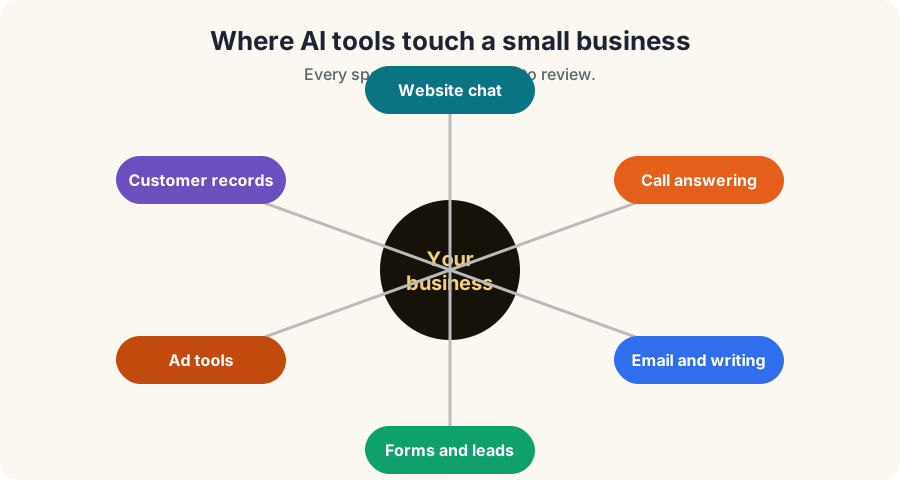
Small businesses now use AI in many places: website chat, call answering, email drafting, lead follow up, document tools and ad tools. Each connection is a door. If a chatbot can read your customer list, or an AI tool can send email for you, someone may try to trick it into doing something you did not intend.
You do not need to be a large company to be a target. Smaller businesses often have fewer people watching for problems, which can make a mistake more costly. That is the reason security should be part of the plan from the start, not a repair after something goes wrong.
At One80, our own chat assistant is built with this in mind. It is built to link only to pages that exist, to keep its instructions private and to stay under spending caps. We think every owner using AI should ask the same questions about their tools.
The main AI risks in simple words
OWASP, a respected nonprofit security community, publishes a Top 10 list of risks for applications built on large language models, the technology behind many chatbots. Here are the ideas in everyday terms.
| Risk | What it means | Small business example |
|---|---|---|
| Prompt injection | Someone writes text that tricks the AI into ignoring its rules | A visitor tells your chatbot to reveal its instructions or offer a fake discount |
| Sensitive data leaks | The AI reveals private information it can access | A tool that can see customer records shares them with the wrong person |
| Too much access | The AI is allowed to do more than it needs to | A helper that can send email or change files without approval |
| Untrusted outside content | The AI trusts text from a web page, email or file | A hidden instruction in a document that the tool reads and obeys |
| Weak connections (APIs) | The systems behind the tool are poorly protected | An old or forgotten endpoint that anyone can call |
Prompt injection is the one most owners hear about first. It is also why a business chatbot should have clear limits, approved links and a hand-off to a person.
What an API is, and why it matters
An API is how one piece of software talks to another. Your website form talks to your spreadsheet through an API. Your chatbot talks to an AI service through an API. If those connections are undocumented, forgotten or open to anyone, they become a weak point. Chronoloq says on its website that it scans APIs and finds unknown or undocumented ones, which it calls shadow APIs.
What Chronoloq says it offers
According to Chronoloq's website, the company offers:
- A Chronoloq Score. A personalized AI risk assessment with a prioritized path to fix the biggest issues.
- AI and API vulnerability scanning. It maps the AI systems and APIs your business uses and looks for weaknesses.
- Third-party risk assessment. It says it uses publicly available information.
- Compliance reporting. It lists alignment with frameworks such as OWASP, NIST, SOC 2, HIPAA and GDPR.
- A runtime AI firewall. It describes this as patent-pending.
- Training and consulting. For teams that want to learn how to use AI safely.
It says it is built for small and mid-size organizations in areas such as finance, healthcare, education, ecommerce and software, and that it needs no agents or code changes to get started. We report these claims as the company states them. Ask them to show you how each one works for your setup.
Why Chronoloq may be worth a look
Most security tools cover either AI or APIs. Chronoloq says it protects both in one platform, which matters because an AI chatbot is usually connected to your systems through an API. In its own words, its approach needs no agents, no code changes and no interruption to production, and it combines scanning with active protection instead of only blocking traffic.
It also lists coverage for newer AI plumbing that older tools were not built around: large language models, retrieval pipelines that feed documents to a chatbot, agent-to-agent protocols and the Model Context Protocol. If your business is adding AI assistants to customer service or internal workflows, those are the connections to understand. Its website includes a comparison against other vendors; compare it yourself and ask each vendor to demonstrate the capabilities that matter to you.
The experience behind Chronoloq
Chronoloq says its team brings experience from security companies and enterprises including Ford, RSA, Cequence, McAfee and FireEye, with more than 10 years of hands-on work protecting critical systems and more than 50 years of combined industry and business advisory experience. Its website also lists a group of advisors covering cybersecurity product strategy, business growth, marketing and intellectual property law. Its stated mission is to make enterprise-grade AI and API security available to organizations regardless of size or technical resources.
We report this as the company presents it. The website does not say which person worked at which employer, so ask who would actually work on your assessment and what they have done before.
What about big business?
A common question is whether Chronoloq is built for large enterprises. Its website says it targets small and mid-size organizations, and that it wants to bring enterprise-grade capability to teams that cannot afford enterprise complexity. It lists solution pages for finance, healthcare, education, ecommerce and software, private equity firms and managed service providers. A larger company can still benefit, especially a business unit, a portfolio company or a regulated team that needs a fast first assessment. But if you run a company with a large internal security team and strict procurement rules, expect to run your own vendor review, and ask about reference customers, certifications and contract terms. We will not tell you it is an enterprise suite when its own site says otherwise.
How a Chronoloq review works
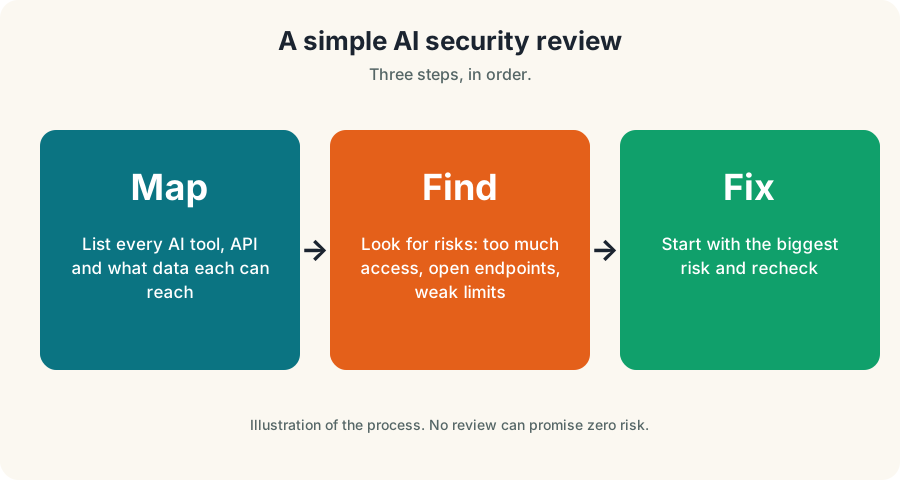
Chronoloq describes a simple path.
- Map. It maps the AI systems and APIs your business uses.
- Find. It looks for vulnerabilities, with no agents to install.
- Prioritize. You get a personalized score and an ordered list of what to fix first.
The first step offered on its website is a FREE AI security audit.
A simple AI security checklist you can use today
You can start before you talk to anyone. Write answers to these ten questions.
- Which AI tools do we use? List every chatbot, writing tool, call tool and ad tool.
- What data can each one see? Customer names, phone numbers, emails, payments.
- What can each one do? Read only, or send, change and delete.
- Who can change its instructions? Limit this to a few trusted people.
- Does a person approve important actions? Money, deletions and customer messages should have a human check.
- Are our passwords and keys private? Never put API keys in website code that visitors can see.
- Do we limit spending? Set caps with the AI provider.
- Do we log and review what the AI says? Read samples every month.
- Do we have a plan if it goes wrong? Who turns it off and who tells customers.
- Have we asked our vendors how they protect our data? Get answers in writing.
Where AI security meets your website and marketing
If you use an AI chatbot, call assistant or lead tool on your site, the website, the forms and the AI tool all need to be built safely. Security headers, protected keys and clean forms are part of how we build every site. See our Pittsburgh web design and development service and our guide to AEO and AI search. Our Pittsburgh AI search optimization page explains how to be found in AI answers, which is a separate question from being safe when you use AI.
Small business owners in Pittsburgh, Youngstown and Chicago ask us about both. The honest answer is that visibility and security are different jobs, which is why we recommend a specialist for security instead of doing it ourselves.
Questions to ask any AI security provider
| Question | A good answer sounds like |
|---|---|
| What will you look at first? | A clear map of your AI tools and connections |
| What will I receive? | A written report and a prioritized fix list |
| Do you need access to my systems? | A clear, limited answer about what and why |
| How do you handle my data? | A written policy |
| What do you not promise? | No claim of total protection |
| What does it cost? | A written scope and price |
No security product can promise that nothing will ever go wrong. Be careful with anyone who does.
Book a FREE AI security audit
See the Chronoloq page and book
A one-hour AI tool inventory
You can do this with a pen and a spreadsheet.
- Open a sheet with five columns: tool, what it does, what data it can see, what it can do, who owns it.
- List the obvious tools first: website chat, call answering, writing assistants, scheduling and ad tools.
- Add the hidden ones: plugins, browser extensions, apps your team installed and forms that send data to other services.
- Mark the risky rows: any tool that can see customer data or take action without approval.
- Pick one owner per tool who is responsible for its settings and logins.
Five rules for staff who use AI at work
- Do not paste private customer data into tools you have not approved.
- Check anything the AI writes before it goes to a customer.
- Never share passwords or API keys with a chatbot.
- Report strange answers or behavior right away.
- Use approved tools only, and ask before adding new ones.
Which Pittsburgh businesses should care most
| Business type | Why AI risk matters |
|---|---|
| Healthcare and wellness | Patient information is sensitive and regulated |
| Law, accounting and finance | Client records and financial data |
| Home services and contractors | Customer addresses, phone numbers and payment links |
| Ecommerce and retail | Customer accounts and order data |
| Education and training | Student information |
If you handle regulated data, ask a qualified professional about your legal duties. We are marketing and web specialists, not lawyers, and nothing here is legal advice.
Glossary
Terms
- LLM: large language model, the technology behind many chatbots
- Prompt: the text given to an AI tool
- Prompt injection: text that tricks an AI tool into ignoring its rules
More terms
- API: how one software service talks to another
- Shadow API: a connection nobody tracks or documents
- Firewall: a filter that blocks unsafe traffic
What to do if an AI tool misbehaves
Even careful businesses will see an AI tool say something odd. Decide in advance what you will do.
- Turn it off or limit it. Know who can pause the chatbot, the call assistant or the automation, and how.
- Save the evidence. Keep the conversation, the time and the page where it happened.
- Check what it could reach. Which customer data or accounts did the tool have access to?
- Change keys and passwords for anything it connected to if you think access was exposed.
- Tell the people affected if their information may be involved, and ask a qualified professional about any legal duty to report.
- Fix the cause, then test again before turning it back on.
AI security for small business in Pittsburgh: what to do this week
If you run a Pittsburgh business that uses AI, you can make real progress in a week. On day one, write the tool list. On day two, remove access you do not need. On day three, set spending limits and approval steps. On day four, write the five staff rules and share them. On day five, request a FREE AI security audit or book a call to get an expert view of the biggest risks. AI security for small business is not about fear. It is about knowing what is connected and keeping control of it.
We see this question from Pittsburgh owners who have added chatbots and call assistants to their websites. The same habits apply whether you are in Lawrenceville, Cranberry Township or anywhere else: limit what the tool can see, limit what it can do and keep a person in charge.
Questions people ask
What is AI security for small business?
It is the practice of finding and reducing the risks from the AI tools and connections a small business uses, such as chatbots, call assistants and the APIs behind them.
What is prompt injection?
It is when someone writes text that tricks an AI tool into ignoring its rules or revealing information. OWASP lists it among the top risks for applications built on large language models.
Is Chronoloq only for large companies?
Its website says it is built for small and mid-size organizations.
Does One80 have a relationship with Chronoloq?
Yes. We list it as a trusted partner and its website carries a testimonial from One80. We disclose this at the top of the guide.
Can I do a basic check myself?
Yes. Use the ten-question checklist above, then ask a specialist to review what matters most.
Next steps
Start with your list of AI tools and what each can access. Then use the FREE audit or a call to get an expert view. If you need help with your website or visibility, talk to us through the contact page.
Questions, answered
What is AI security for small business?
It is finding and reducing the risks from AI tools and the connections behind them, such as chatbots, call assistants and APIs.
What is prompt injection?
It is text written to trick an AI tool into ignoring its rules or revealing information. OWASP lists it among the top risks for large language model applications.
Is Chronoloq only for large companies?
Its website says it is built for small and mid-size organizations.
Does One80 have a relationship with Chronoloq?
Yes. We list it as a trusted partner, and its website carries a testimonial from One80. We disclose it at the top of the guide.
Can I check my AI risk myself first?
Yes. Use the ten-question checklist, then ask a specialist to review what matters most.
Ask Eighty. He answers in plain English, any time.
Want this done for your business?
Book a FREE 20-minute growth call. We will tell you where you stand and what to fix first.
Get my FREE growth plan AI searchAEO Content: What It Looks Like, With Examples
 AI searchAEO for Ecommerce: Get Your Products Recommended
 AI searchAEO Services: What They Include and What to Avoid