
Home / Blog / How to Track AEO: A Simple Monthly Routine
AI searchHow to Track AEO: A Simple Monthly Routine
Learn how to track AEO with Search Console, referral visits, prompt tests and real leads. A one-hour monthly routine and a FREE tracking sheet.

- Combine four signals: Search Console, referral visits, prompt tests and leads.
- Google counts AI feature traffic in your normal Search Console Performance report.
- Re-run the same ten prompts every month and record who is named and which facts are right.
- Calls, forms and bookings decide whether AEO is paying off.
How to track AEO comes down to four checks every month: how your pages perform in Google Search Console, which AI assistants send visitors to your site, what assistants say when you ask real customer questions, and whether calls and form leads are growing. No single tool shows your "AEO score", so a simple monthly routine and a tracking sheet will tell you more than any dashboard.
This guide gives you that routine step by step. It works for a one-person business and takes about an hour a month once it is set up. If you want the background first, read what AEO is.
Why tracking AEO is different
Classic SEO has clear numbers: rankings, clicks, impressions. AI assistants are different because answers change from one person and one day to the next, and many assistants do not report anything back to site owners. Google also folds its AI feature traffic into its standard reports rather than splitting it out. So tracking AEO means combining a few imperfect signals and watching the trend, not obsessing over one number.
Google says AI feature traffic is included in the overall search traffic in Search Console and reported in the Performance report under the Web search type. It also says clicks from results with AI Overviews tend to come from users who spend more time on the site.
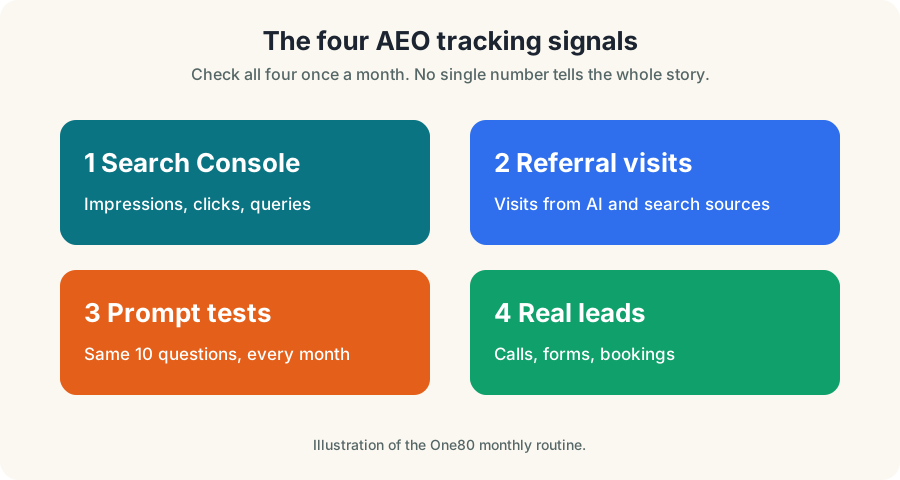
How to track AEO: the four-part routine
- Search Console. Track impressions, clicks and queries for the pages you improved.
- Referral traffic. In your analytics, look for visits that come from AI assistants and search engines.
- Prompt tests. Ask the same customer questions every month and record who gets named.
- Leads. Count calls, form submissions and bookings, and ask new customers how they found you.
Part 1: Google Search Console
Search Console is FREE and shows how your site appears in Google. Set it up by verifying your site, then follow these steps each month.
- Open Performance and choose the Search results report.
- Set the date range to the last three months and compare it with the previous three months.
- Check Queries. Look for question-style searches, such as those starting with "how", "what" and "can".
- Check Pages. Look at the pages you rewrote and see whether impressions and clicks moved.
- Open Indexing and make sure your key pages are indexed.
Impressions rising with clicks flat can mean you appear in more places but fewer people click, which is common when answers are shown directly. Do not panic. Pew Research found that people click normal results less often when an AI summary appears, so being visible and being clicked are different goals. Pay attention to both and to leads.
Part 2: Referral traffic from AI assistants
Your analytics tool, such as Google Analytics, shows where visitors came from. Some assistants send visitors with a recognizable source name, and others do not. Look at your traffic sources report, filter for sources that look like AI assistants, and record the visits and what those visitors did. Expect small numbers for a local business at first, and remember that missing data does not prove you are not being used. Many mentions never produce a click.
Part 3: Prompt testing
Prompt testing is the closest thing to an AEO scoreboard. You ask assistants the questions customers ask and record what comes back.
How to set it up
- Pick ten prompts. Mix service questions, cost questions, local questions and comparison questions.
- Pick two or three places. Google, plus the assistants your customers use.
- Use the same wording every month. That makes the comparison fair.
- Record the results. Date, prompt, tool, whether you were named, who else was named, which sources were cited, and whether facts about you were right.
- Use a logged-out browser or a fresh session so your history does not skew the answer.
A tracking sheet you can copy
| Date | Prompt | Tool | Named? | Competitors named | Sources shown | Facts correct? |
|---|---|---|---|---|---|---|
| 2026-10-20 | Who is the best [service] in [city]? | No | List them | List links | n/a | |
| 2026-10-20 | How much does [service] cost in [city]? | Assistant A | Yes | List them | Our pricing page | Yes |
How to read the results
Answers vary from run to run, so look for patterns across several months, not one result. If you are never named, check whether your pages answer the question and whether crawlers can reach them. If your facts are wrong, find the source of the wrong fact, such as an old directory listing, and fix it there.
Part 4: Leads and revenue
The numbers that pay your bills are calls, forms and bookings. Track them separately from website visits.
- Count calls. Use a call tracking number or ask every caller how they found you.
- Track forms and bookings. Set up goals or events in your analytics tool.
- Add a "how did you hear about us" question. Include "AI assistant" as an option.
- Record revenue by source when you can.
This final step is the one that settles the question of whether AEO is worth the effort. Rankings and mentions are only useful if they lead to customers.
A monthly AEO report in one page
Numbers
- Search Console clicks and impressions
- Visits from AI sources
- Calls, forms, bookings
- Number of prompts where you were named
Notes
- Pages updated this month
- Facts found wrong and fixed
- New reviews and mentions
- Next month's three actions
Tools: what you need and what you do not
You can start with FREE tools: Google Search Console, Google Analytics and a spreadsheet. Paid AI visibility trackers exist, and some are useful for businesses with many locations or a large prompt list. For a small business, the FREE routine above covers most of the value. If you do buy a tool, check that it explains how it collects data and does not claim to measure what no one can measure.
Mistakes to avoid
- Judging by one prompt. Answers vary. Look at ten prompts over several months.
- Ignoring leads. Mentions without customers are only a nice feeling.
- Changing the prompts every month. You lose the comparison.
- Forgetting to fix wrong facts. If an assistant gets your hours wrong, find the source.
- Expecting instant change. Google says crawling can take anywhere from several days to several months.
Your first-month checklist to track AEO
- Verify your site in Search Console.
- Set up analytics goals for calls and forms.
- Write ten test prompts and run them once.
- Create your tracking sheet and record the starting point.
- Add "AI assistant" to your "how did you hear about us" question.
- Put a calendar reminder for the same day next month.
If you would like help, our FREE AI Visibility Test is a quick baseline, and our team can set up tracking as part of an AEO service.
Tracking AEO for a Pittsburgh business
Track the same four signals, then add a Pittsburgh layer. In Search Console, filter queries that contain "Pittsburgh" or your neighborhoods and watch impressions and clicks monthly. In your prompt tests, include local prompts such as "best [service] in Pittsburgh", "[service] near Mt. Lebanon" and "how much does [service] cost in Pittsburgh". Record whether you are named and who else is.
- Pick five Pittsburgh prompts and five general prompts.
- Check your Google Business Profile performance for calls, direction requests and website clicks.
- Ask every new Pittsburgh customer how they found you.
Our Pittsburgh SEO services include monthly reporting built around calls and leads.
That is how to track AEO: four signals, one sheet and one hour a month. If you only have ten minutes, track AEO by running your ten prompts and counting calls.
Worked examples by industry
The pattern is the same everywhere, but the details change by business. These are illustrative examples of how to apply tracking in common local industries. Replace the details with your own real facts.
A roofing or home services company
Customers ask: "How much does a roof replacement cost in Youngstown?", "How long does it take?" and "Do I need a permit?" A strong page opens with a plain answer, explains what changes the price (size, pitch, materials, tear-off layers), shows the steps in order and says what a written estimate includes. It names the service area, shows real project photos and lists the company's license and insurance details only if they are real and current.
A dental or medical practice
Patients ask: "Do you take my insurance?", "What happens at a first visit?" and "Is there an emergency appointment?" Pages should answer plainly, avoid promises about outcomes and be reviewed by the practice for accuracy. Health claims need extra care, so state only what the practice can stand behind.
A restaurant or cafe
Guests ask: "Do you have gluten-free options?", "Is there parking?" and "Can you host 20 people?" Put hours, menu, dietary notes, parking and private-event details in plain text, not only in images or PDFs. Keep them identical on the website and Google Business Profile.
A law, accounting or consulting firm
Clients ask: "What does a consultation cost?" and "What should I bring?" Explain the process, who the service is for and who it is not for. Avoid guarantees. Published expertise should be written by the real person who does the work, with a real bio.
An ecommerce or retail shop
Shoppers ask: "Which size should I choose?" and "Can I return this?" Product pages that answer those questions, with consistent product data, give search engines and assistants something dependable to use.
A step-by-step rewrite you can copy
Take one page and do this in order.
- Write the question the page should answer, in the words a customer would use.
- Write a two-sentence answer and put it at the top.
- Add the details underneath: steps, costs, timelines, requirements.
- Add proof. Real photos, real reviews, real credentials and real examples.
- Add a short FAQ of questions people actually ask, with direct answers.
- Check the facts. Every number, name, hour and price must be true today.
- Add a next step. A call button, a form or a booking link.
Common questions people ask next
Is this just SEO with a new name?
Mostly it builds on the same foundation. Clear, useful, accurate pages on a technically healthy site are what both depend on. The difference is emphasis: AEO focuses on direct answers, clear facts, trust and being easy to quote.
Do I need a special file or markup?
Google says there are no additional requirements or special optimizations for its AI features beyond being indexed and eligible to show with a snippet. Structured data is still worth using where it fits, as long as it matches what visitors can see on the page.
How long until I see results?
There is no fixed timeline. Google says crawling and indexing can take anywhere from several days to several months, and results depend on competition and the quality of your pages. Plan on months, not days, and measure monthly.
Can I pay to be recommended?
No reputable method guarantees a mention in an AI answer, and Google says you cannot pay to improve your local ranking. Be suspicious of anyone who promises guaranteed placement.
Glossary
Terms
- AEO: Answer Engine Optimization, making content easy to use as an answer.
- AI Overview: an AI-generated summary shown in Google results.
- Snippet: the text excerpt shown for a page in results.
- Crawler: software that visits pages to read them.
More terms
- Structured data: code that labels facts on a page for machines.
- Citation: a source an assistant links or names in an answer.
- Prompt: the question a person types or says to an assistant.
- Entity: a clearly identified thing, such as your business.
A 90-day plan
- Days 1 to 30: foundation. Confirm your site is indexed, crawlers are allowed, your Google Business Profile is complete and your facts match everywhere.
- Days 31 to 60: content. Rewrite your five most important pages answer-first and add honest FAQs.
- Days 61 to 90: proof and measurement. Collect real reviews, add case examples you have permission to share and start a monthly prompt-testing sheet.
Honest limits
No one controls what an AI assistant says. Answers change, sources change and platforms change their rules. What you can control is the quality, clarity and accuracy of what you publish, and how easy it is for customers and machines to trust it. That is a good investment even if the technology shifts, because the same pages serve people who find you in any way.
Questions, answered
How do I track AEO?
Use Google Search Console for impressions and clicks, your analytics for visits from AI sources, a monthly list of test prompts for mentions, and your calls and forms for results.
Does Google Search Console show AI Overviews traffic?
Google says traffic from its AI features is included in your overall Search Console data and reported under the Web search type in the Performance report.
What is prompt testing?
Asking assistants the same customer questions each month and recording whether you are named, who else is named, which sources appear and whether the facts about you are correct.
Do I need a paid AEO tracking tool?
Not to start. A spreadsheet, Search Console and analytics cover most of the value for a small business.
Why are my AI referral numbers so low?
Many assistant mentions never produce a click, and some assistants do not pass a clear referral source. Customers may also search for you by name afterward.
Ask Eighty. He answers in plain English, any time.
Want this done for your business?
Book a FREE 20-minute growth call. We will tell you where you stand and what to fix first.
Get my FREE growth plan AI searchAEO Content: What It Looks Like, With Examples
 AI searchAEO for Ecommerce: Get Your Products Recommended
 AI searchAEO Services: What They Include and What to Avoid