
Home / Blog / Google Maps Ranking Youngstown: 9 Steps That Work in 2026
Google Business ProfileGoogle Maps Ranking Youngstown: 9 Steps That Work in 2026
Google Maps ranking Youngstown comes down to a complete profile, honest reviews and steady habits. Nine steps, plus the Pittsburgh version of the playbook.

- Google Maps ranking Youngstown is built on relevance, distance and prominence, and you can only change two of the three.
- A complete profile with the right main category and real photos is the base. Reviews and local mentions build on it.
- The same playbook drives Pittsburgh Google Maps ranking, but Pittsburgh needs sharper service areas and stronger prominence.
- Check your ranking from several spots around town, not just from your office.
Google Maps ranking Youngstown depends on three things you can control: a complete Google Business Profile, honest reviews and details that match everywhere online. Do those well, every month, and you give Google every reason to show you when a nearby customer searches. Nobody can promise a position, but this is the work that moves it.
We run this playbook for Mahoning Valley businesses and for Pittsburgh clients, because the same rules apply in both markets. This guide gives you nine steps, a table of what to fix first, and a section on how Pittsburgh Google Maps ranking differs.
What Google Maps ranking Youngstown really means
Google Maps ranking Youngstown is the order in which businesses appear when someone nearby searches for what you sell. The top three listings in the map block get the most attention, because most people tap a name they see without scrolling.
Your Google Maps ranking Youngstown position is not one fixed number. It changes with the searcher's location, the words they use and the time of day. A plumber in Boardman can rank first for a customer in Boardman and fifth for one in Austintown. That is normal, and it is why we test from several spots instead of trusting a single result.
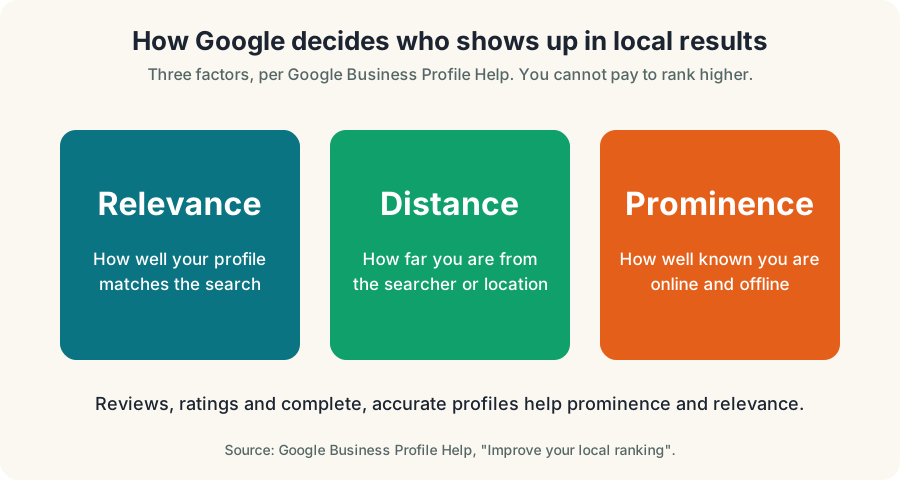
How Google decides: relevance, distance and prominence
Google Business Profile Help says local results are based mainly on relevance, distance and prominence. Relevance is how well your profile matches the search. Distance is how far you are from the searcher. Prominence is how well known you are, which includes reviews, links and mentions.
You cannot move your building. You can improve relevance and prominence to lift your Google Maps ranking Youngstown, and that is where the next nine steps go. Google also says you cannot pay to rank higher, so be wary of anyone who sells a guaranteed spot.
| Factor | What it means | What you control |
|---|---|---|
| Relevance | Does your profile match the search? | Categories, services, description, website pages |
| Distance | How close are you to the searcher? | Your real address and service areas |
| Prominence | How well known are you online? | Reviews, replies, local links, mentions |
The 9-step checklist for Google Maps ranking Youngstown
- Claim and verify. Search your business on Google and follow the prompts to manage it.
- Pick the right main category. It is your strongest relevance signal.
- Add true secondary categories and list every service you sell.
- Fill in hours, phone and website so they match your site exactly.
- Upload real photos of your team, work and storefront.
- Ask for reviews after every job with a direct link.
- Reply to every review, good or bad.
- Build one strong page per service on your website.
- Check your ranking monthly from the same locations.
The next sections walk through the steps that move the needle most. If you want us to run them for you, see our Google Business Profile optimization for Ohio service.
Step 1 to 3: claim the profile and get your categories right
Every Google Maps ranking Youngstown project starts with ownership. Search your business name on your phone. If you see a profile with a "Claim this business" option, claim it. If nothing appears, create one. Then verify it, because an unverified profile limits what you can manage.
For Google Maps ranking Youngstown, your main category matters more than anything else you type. A business that sells and installs garage doors should not choose a broad category like "contractor" when a precise one exists. Pick the category a customer would use to describe you, then add secondary categories only where they are true.
Do not stuff keywords into your business name. Use the name on your sign. A name padded with city and service words is a common reason profiles get flagged or suspended.
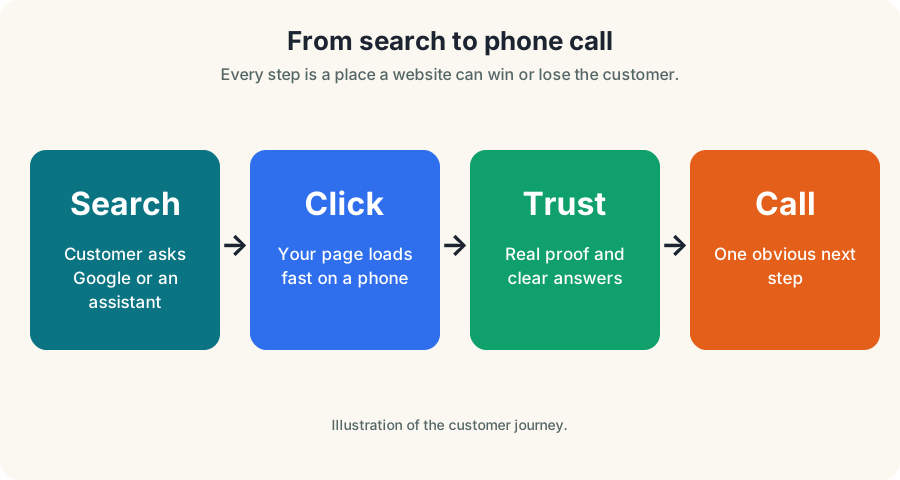
Services, description and posts
List every service you sell, using the words customers use. A Youngstown HVAC company should list furnace repair, air conditioner installation and maintenance plans as separate services, not one vague line. Clear services help Google match you to specific searches, which is the relevance part of Google Maps ranking Youngstown.
Write your business description for people first. Say what you do, who you serve and where. Keep it factual and skip claims you cannot back up, such as "the best in town".
Use Google Business Profile posts for real news: a seasonal offer, a finished project or a change in hours. Keep them short, add a photo and include a clear next step. Posting is not magic, but it keeps the profile active and gives customers current information.
Also check the options that fit your business, such as service areas for businesses that travel to the customer and products for shops. Use only what is accurate, and keep it updated.
Step 4: make the details match your website
Name, address and phone, often called NAP, should read the same on your profile, your website footer and every directory. "Suite 2" in one place and "Ste. 2" in another is a small thing, but small mismatches add confusion when you multiply them across a dozen listings. Clean data supports your Google Maps ranking Youngstown because Google cross-checks what it finds.
Hours deserve special care. Holiday hours, seasonal hours and after-hours emergency lines are the details customers actually act on. If your profile says you are open and the door is locked, you lose the customer and often get the bad review.
Step 5: photos that earn trust
Real photos beat stock images every time. Upload your storefront, your trucks, your team in uniform and finished work. For a Youngstown restaurant, that means the dining room and the plates. For a roofer, it means completed roofs and the crew on site.
Photos are a quiet part of Google Maps ranking Youngstown, because they show customers the business is real. Add them steadily instead of dumping fifty at once. A fresh photo every week or two tells customers the business is active. Skip anything with a phone number watermarked on it from another company, and never use photos you do not own.
Step 6 and 7: reviews and replies
Reviews feed prominence, and prominence feeds Google Maps ranking Youngstown. Google says more reviews and positive ratings can improve your local ranking, so a steady habit beats a one-time push. The easiest moment to ask is right after a job goes well, while the customer is still pleased.
Send a direct link by text. Keep the message short and personal. Never offer money or gifts for reviews, never write your own and never gate by asking only happy customers. If you want a system for this, our review management in Ohio service handles requests and replies.
Reply to every review within a few days. Thank people by name and mention the actual job. For a negative review, stay calm, say what you will do and offer to talk offline. Future customers read your replies more closely than the complaint itself.
Step 8: your website supports your map ranking
Your profile links to your website, and Google reads that page to understand you. A strong site is part of Google Maps ranking Youngstown, not a separate job. A thin homepage hurts. Build one page per main service and one for each city you serve, each answering the question a customer would type.
Make those pages fast and easy to use on a phone. web.dev's Core Web Vitals "good" thresholds are an LCP of 2.5 seconds or less, an INP of 200 milliseconds or less and a CLS of 0.1 or less. A slow page loses the customer before the call button matters. Our conversion-focused website guide covers what a service page should do.
Pittsburgh Google Maps ranking: the same rules, a tougher field
Pittsburgh Google Maps ranking follows the same three factors. What changes is the competition and the geography. A solid Google Maps ranking Youngstown profile is a good template, but Pittsburgh asks for more. A bigger metro usually means more businesses chasing the same searches, so thin profiles get buried faster. A Pittsburgh Google Business Profile has to work harder on prominence.
Pittsburgh is also a city of distinct neighborhoods. Someone in Lawrenceville and someone in Mt. Lebanon may search the same service and see different results. That is why service areas and location pages matter. For the full local picture, see our Pittsburgh SEO services page.
If you serve both the Mahoning Valley and Western Pennsylvania, keep your Youngstown and Pittsburgh pages genuinely different. Copy-pasting one page with the city name swapped does nothing for either market.
Where Pittsburgh customers actually search from
Customers search from where they are, not from where you are. A short list of places customers might search from, and what to do about each:
| Search origin | What to do |
|---|---|
| Strip District or Lawrenceville | Build a page around the specific service and mention the area you truly serve |
| Squirrel Hill, Shadyside or Oakland | Show proof you work there, such as photos of local jobs |
| South Side | Check hours and parking details, since customers act on them |
| Mt. Lebanon or Bethel Park | Set a service area that includes these suburbs if you really go there |
| Cranberry Township or Monroeville | Decide whether you serve it, then say so clearly on the page and profile |
Only list places you really serve. Listing twenty suburbs you never visit invites poor reviews and wasted leads.
A hypothetical example
Suppose a Pittsburgh roofer works mostly in Bethel Park and Mt. Lebanon but lists the whole county as a service area. Calls come in from places the crew will not drive, and the sales team wastes time. The fix is to trim the service area to the real one, choose the precise main category and add photos from recent local jobs. This is an illustrative scenario, not a client result.
The same thinking applies in Youngstown. Know where you will work, say so, and let your profile and website agree. That discipline is what good Google Maps ranking Youngstown work looks like.
Local links and mentions
Prominence also includes how well known you are outside Google. Chamber of commerce listings, local associations, supplier pages, sponsorships and news mentions all help. A few real local links beat dozens of junk directories.
For a Pittsburgh small business, that might be a neighborhood business association or a community event you sponsor. For a Youngstown business, it could be the local chamber or a school team. Pick ones a real customer could find and trust. These mentions quietly support Google Maps ranking Youngstown over time.
If you are mapping out how this fits with your wider plan, our local SEO agency in Ohio page explains how we connect profile work to website work.
How to check your Google Maps ranking Youngstown without fooling yourself
Searching from your office will mislead you. Google personalizes results by location and history. Instead, use your phone, stand in several places and search the way a customer does.
- Choose five spots around your service area.
- Search the same three phrases at each spot, such as "[service] near me".
- Record where you appear in a simple sheet.
- Repeat monthly at the same spots.
- Track calls and direction requests from your profile, not just position.
Our FREE Map-Pack Showdown helps you compare yourself with a competitor.
Mistakes that hurt Google Maps ranking Youngstown
Most weak profiles share the same few problems:
- A wrong or too-broad main category.
- Hours that are out of date.
- Stock photos, or no photos at all.
- Reviews that go unanswered.
- A website that does not match the profile.
- A business name padded with keywords.
None of these cost money to fix. They cost an afternoon. Our list of website mistakes losing leads covers the website side.
Maps, ads and AI search: how they fit together
Maps is one door, and Google Maps ranking Youngstown is only one of the ways customers find you. Customers also use ads and, increasingly, AI answers. Google Search Central says there are no special requirements for AI Overviews and AI Mode beyond the usual Search fundamentals, and that pages must be indexed and snippet-eligible. A good profile and a clear website help in both places.
Pew Research Center found in July 2025 that users clicked a traditional result about 8% of visits when an AI summary appeared, versus about 15% without one. Being named and trusted matters as much as being clicked. Read our guide on tracking AEO and local SEO versus Google Ads to decide where to spend.
A 30-day plan
Here is a simple month to start improving your Google Maps ranking Youngstown without guessing.
- Week 1. Verify the profile, fix the main category and correct hours, phone and website.
- Week 2. Add services and at least a handful of real photos.
- Week 3. Send review requests to recent happy customers and reply to every existing review.
- Week 4. Check your ranking from five spots, write down the baseline and plan the next month.
When to bring in help
You can do all of this yourself, and many owners improve their Google Maps ranking Youngstown that way. Bring in help when you do not have the time, when you serve several locations or when you want to move into Pittsburgh. Our Pittsburgh digital marketing team builds profiles, pages and reviews for Pittsburgh local SEO, and our Youngstown SEO services page covers the home market.
Want an honest read on your Google Maps ranking Youngstown today? Contact us for an honest review of your profile.
Questions, answered
How do I improve my Google Maps ranking in Youngstown?
Claim and verify your Google Business Profile, choose the right main category, fill in services, hours and photos, ask for reviews after every job, reply to all of them and keep your name, address and phone identical across the web.
Can I pay to rank higher on Google Maps?
No. Google Business Profile Help states that you cannot pay to rank higher in local results. Google Ads are separate and are labeled as ads.
Do reviews affect Google Maps ranking?
Google says more reviews and positive ratings can improve your local ranking. Earn them honestly, never buy them and reply to each one.
Does the Pittsburgh Google Business Profile work differently from Youngstown?
The rules are the same. Pittsburgh usually has more competitors and more distinct neighborhoods, so service areas, categories and reviews matter more.
How long does Google Maps ranking take to improve?
There is no fixed timeline and nobody can promise a position. Expect months of steady work, then compare your results from the same spots each month.
Ask Eighty. He answers in plain English, any time.
Want this done for your business?
Book a FREE 20-minute growth call. We will tell you where you stand and what to fix first.
Get my FREE growth plan Google Business ProfileGoogle Business Profile Checklist for Ohio Businesses