
Home / Blog / Website Mistakes Losing Leads: 9 Pittsburgh Fixes
WebsitesWebsite Mistakes Losing Leads: 9 Pittsburgh Fixes
Website mistakes losing leads are usually simple: hidden phone numbers, slow pages, weak calls to action, no tracking. Nine fixes for Pittsburgh businesses.

- Most website mistakes losing leads are basic: a hard-to-tap phone number, slow pages and no clear next step.
- Test your site on a real phone, on mobile data, from the point of view of a stranger.
- Fix in order of damage: phone access, speed, call to action, forms, proof, then tracking.
- If you do not count calls and forms, you cannot tell which fix worked.
The website mistakes losing leads for most Pittsburgh small businesses are not exotic. A phone number that takes three taps to dial, a page that jumps while it loads, a form that asks for twelve things. Each one sends a ready-to-buy visitor back to the search results, where a competitor is one tap away.
This guide walks through nine of them, in the order we would fix them. We work with local businesses in the Youngstown, Pittsburgh and Chicago areas, and the pattern repeats everywhere. If you want the positive version of this topic, read our guide to a conversion focused website afterward.
Why website mistakes losing leads cost more in Pittsburgh
Pittsburgh is a market of neighborhoods. Someone in Squirrel Hill, Shadyside or Lawrenceville searches for a plumber, a dentist or a designer on a phone, often in a hurry, and often with three tabs open. They do not read. They scan for two things: can you help me, and how do I reach you.
If your site fails either test in a few seconds, they leave. You never see them in a report as a lost customer. You only see a quiet month.
This is why Pittsburgh web design is less about looks and more about removing friction. The same visitor can be won or lost by a button, not a brand color.
Run a 30 minute audit before fixing website mistakes losing leads
Do not guess which mistake is yours. Check them in one sitting, on a phone, using mobile data instead of office Wi-Fi. A Pittsburgh visitor on a spotty connection in Monroeville or Bethel Park is closer to your real customer than your fast office network.
- Open your homepage on your phone. Time how long until you can read the headline and tap a button.
- Find your phone number. Count the taps needed to start a call.
- Ask a stranger. Give a friend 10 seconds to find your main service and your contact method. Do not help.
- Submit your own form. Check the confirmation, and check that the message actually arrives.
- Search your service plus your area. See which of your pages Google shows and whether it matches the search.
- Check your tracking. Can you see how many calls and forms came in last month?
Fixing website mistakes losing leads starts with evidence. Write down what you find. Each of the nine website mistakes losing leads below maps to one of those six checks, so you can see which ones apply to you.
Mistake 1: A phone number that is hard to reach
Local customers still call. A phone number buried in the footer, set as an image or shown as plain text that cannot be tapped, is one of the most expensive website mistakes losing leads.
The fix is simple advice. Put a tappable phone link in the header on every page. Keep a sticky call button on mobile. Repeat the number after your proof and at the end of each service page. Make sure the number is the same everywhere it appears, including your Google Business Profile.
Suppose a Pittsburgh roofer has a number only in the footer. A homeowner standing under a leaking ceiling has to scroll, pinch and copy it. That is an illustrative example, not a client result, but you can feel the problem. Calls are won in the first ten seconds.
Use our FREE missed call calculator to see what unanswered calls could be costing you, and make sure someone actually picks up.
Mistake 2: Slow, jumpy pages
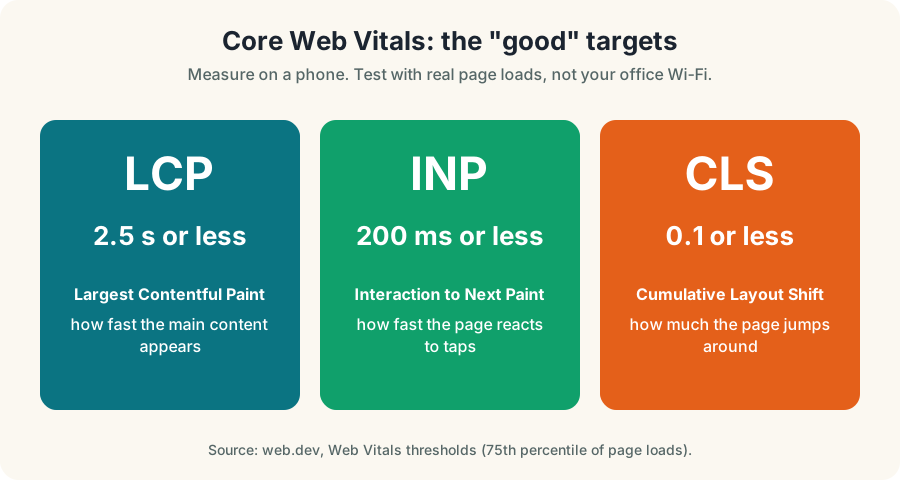
Speed is not a vanity metric. web.dev sets "good" thresholds for three Web Vitals: Largest Contentful Paint of 2.5 seconds or less, Interaction to Next Paint of 200 milliseconds or less and Cumulative Layout Shift of 0.1 or less. Those are the targets to test against.
Typical causes on small business sites are oversized photos, too many plugins, heavy sliders, auto-playing video and third-party chat widgets that load before the content.
Practical fixes:
- Compress and resize every image, and use modern formats.
- Remove plugins and scripts you do not use.
- Replace sliders with one strong image and one headline.
- Reserve space for images and embeds so the layout does not jump.
- Retest on a phone after every change.
A jumpy page is also a trust problem. If a button moves as the visitor taps, they hit the wrong thing and leave. Of all the website mistakes losing leads, speed is the easiest to measure, so start there if you like numbers.
Mistake 3: No single, clear call to action
Many sites offer six next steps on the first screen: call, email, chat, book, download, follow. The visitor freezes.
Pick one primary action per page. For a roofer it is "Request a FREE estimate". For a dentist it is "Book a visit". For a consultant it is "Book a call". Put the button where eyes land, repeat it after your proof, and give it a verb.
Cluttered buttons are website mistakes losing leads that look harmless in a design review. Secondary actions can exist, but they should look quieter. Our guide to a conversion focused website shows how to place each one.
Mistake 4: Headlines that do not say what, who and where
A headline like "Quality you can trust" says nothing. A visitor from Oakland or Cranberry Township wants to know three things: what you do, who it is for and whether you serve their area.
A vague headline is one of the website mistakes losing leads right at the top of the page, before anyone scrolls. Rewrite the first screen so it answers all three in one sentence. "Emergency plumbing for homes in Mt. Lebanon and South Hills" beats a slogan. Follow it with one line on how fast you respond or how you work, then the button.
The same rule applies to service pages. Each page should open with a direct answer to the question the customer searched, then add detail. That helps people, and it helps Pittsburgh SEO because search engines can see what the page is about.
Mistake 5: Forms that ask for too much
A long form is a quiet leak. Asking for a budget, a timeline, a company size and a full address before anyone has spoken to you makes people quit.
Long forms are website mistakes losing leads at the last step, when the visitor was already willing to talk. For most local services, ask for name, phone or email and one short question. You can collect details on the call. Add a line under the button that says when you will reply, but only if you can keep that promise.
Check these form basics:
- Fields are large enough to tap on a phone.
- The keyboard type matches the field, so phone fields open the number pad.
- Error messages are clear and do not erase what was typed.
- A confirmation message appears, and an email reaches your inbox.
- Spam protection does not block real people.
Submit your own form once a month. A broken form is invisible until you test it.
Mistake 6: Thin pages that ignore how people search now
Search is changing. Pew Research Center (July 2025) found that users clicked a traditional result in about 8% of visits when an AI summary appeared, versus about 15% without one. Fewer clicks means every visit you do get must count.
Google Search Central says there are no additional requirements, special optimizations, new files or special schema needed to appear in AI Overviews and AI Mode beyond the usual Search fundamentals. Pages must be indexed and eligible to show with a snippet, and structured data must match visible text.
None of the website mistakes losing leads in this guide needs an AI trick to fix. The answer is useful pages: one per service, one per important location, with direct answers, real details and a clear next step. Our Pittsburgh AI search optimization page explains how this fits together, and you can check your baseline with the FREE AI visibility test.
Mistake 7: Weak local proof
People from Pittsburgh want to know you are real and nearby. Stock photos of smiling strangers do not help. Real photos of your team, your trucks, your shop or your finished work do.
Show proof near the button: real customer reviews, licenses and insurance you actually hold, and your real address or service area. Never invent testimonials or numbers, and never copy a competitor's. Anonymous pages are website mistakes losing leads even when the service is excellent.
Google Business Profile Help says local ranking is based on relevance, distance and prominence, that you cannot pay to rank higher, and that more reviews and positive ratings can improve ranking. That makes your profile and your website a pair. If one says one thing and the other says something else, both lose trust. Our guide to ranking on Google Maps covers the profile side.
Mistake 8: No tracking, so no learning
You cannot fix what you cannot see. Many small business sites have no call tracking, no form event and no record of where leads came from.
Set up the basics:
- Google Analytics with events for form submissions and phone taps.
- Google Search Console, to see queries and indexing.
- A call tracking number or a "how did you hear about us" question.
- A simple monthly sheet: visits, calls, forms, bookings.
Skipping measurement is one of the website mistakes losing leads that hides all the others. Do this before a redesign. Tracking tells you which pages work, so you do not redesign the good ones. Our guide on how to track AEO includes a monthly routine that works for general lead tracking too.
Mistake 9: A site that is not built to be found
A pretty site with no structure is hard to rank. Each service needs its own page. Each page needs one H1, clear headings, a unique title and description, and internal links to related pages. Service area pages should be real, with real content, not copies with the city name swapped.
Structure problems are website mistakes losing leads from search itself, before a visitor ever arrives. Design and search belong together. Read why in SEO and web design together. If you want help, our Pittsburgh SEO services and Pittsburgh web design and development teams work on both at once.
Which fix first: a priority table
Not every fix has the same payoff. Use this order for website mistakes losing leads as a starting point, and adjust it for your business.
| Priority | Mistake | Time to fix | What to check |
|---|---|---|---|
| 1 | Hard-to-reach phone number | Under a day | Tap to call from every page |
| 2 | Slow, jumpy pages | Days to weeks | Web Vitals on a phone |
| 3 | No clear call to action | A day | One primary button per page |
| 4 | Vague headline | A day | What, who, where in one sentence |
| 5 | Long forms | A day | Test and receive a submission |
| 6 | Thin service pages | Weeks | One page per service |
| 7 | Weak local proof | Weeks | Real photos and reviews |
| 8 | No tracking | A day or two | Calls and forms counted |
| 9 | Poor structure | Weeks | Titles, headings, links |
A 30 day plan for Pittsburgh small businesses
You do not need to fix every one of these website mistakes losing leads at once. This plan fits around a normal workday.
- Week 1: contact path. Add a tappable phone number and a sticky mobile button. Shorten the form.
- Week 2: speed. Compress images, remove unused plugins and retest on a phone.
- Week 3: message. Rewrite the headline, button and first paragraph of your top three pages.
- Week 4: measurement. Set up call and form tracking and start your monthly sheet.
After that, work on service pages and proof. Use our FREE marketing budget calculator if you are deciding how much to put into fixes versus ads.
What a Pittsburgh visitor does in the first ten seconds
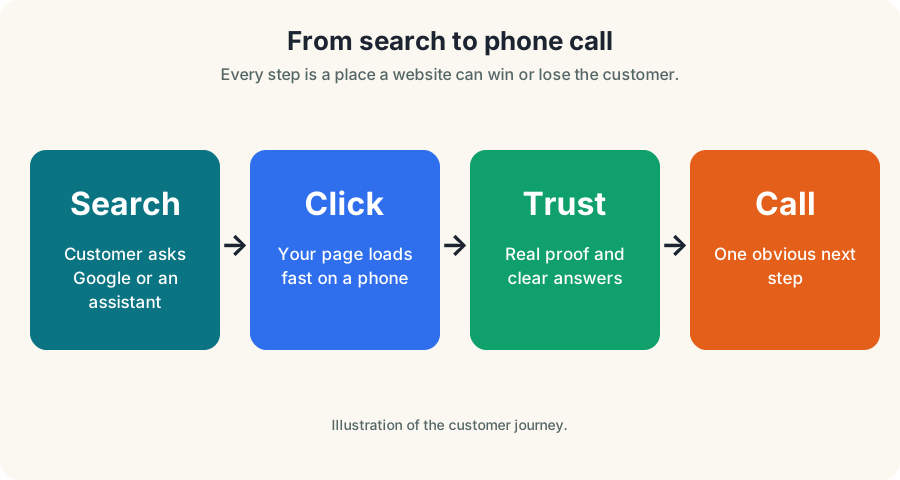
Picture the visit. A person in the Strip District or South Side is on their phone, and they have already tapped two other results. They see your headline. They look for a button. They look for a number. They look for something that proves you are real.
If those four things are clear, they act. If any are missing, they go back. That is the whole game, and it is why website mistakes losing leads are so costly: each is a small gap in a short window.
Trust gaps matter too, and they are website mistakes losing leads that no speed test will catch. A site without an address or service area can feel risky. A page without photos of your team can feel anonymous. A form with no reply promise can feel like a void.
Two illustrative Pittsburgh scenarios
These are hypotheticals, not client results. They show how small gaps add up.
Suppose a Pittsburgh dentist near Oakland has a homepage with a slideshow, a menu of eleven items and a contact form three clicks deep. A new patient who searches for an emergency appointment on a phone sees a slow slideshow and gives up. The fix is boring: one headline, one "Call now" button, one short form, and the slideshow gone.
Suppose a Mt. Lebanon landscaper has one page called "Services" listing everything. Google has no clear page to show for "lawn care Mt. Lebanon". The fix is one page per service and one for each area served, each with real photos and a direct answer at the top.
In both cases the website mistakes losing leads were fixable in weeks, without a new brand. That is typical of Pittsburgh small business sites we review.
Where this connects to ads and local search
If you pay for traffic, these mistakes cost you twice. A click from Google Ads that lands on a slow page with no button is money spent for nothing. Fix the page before raising a budget. Our Pittsburgh Google Ads management work starts with the landing page for exactly this reason.
The same goes for local search. Your Google Business Profile can send people to your website, and if the site fails them, the profile work is wasted. Relevance, distance and prominence get you seen. The site has to close the sale.
When a fix is not enough
Sometimes the website mistakes losing leads are bigger than patches. If the site is on an old template that cannot be made fast, if it breaks on phones, or if every page is thin, a rebuild may be cheaper than endless repairs. Our web design in Ohio and Pittsburgh digital marketing teams can tell you honestly which side of that line you are on.
Be cautious about anyone who promises rankings or a fixed number of leads. No one controls Google, and we do not make guarantees. What we can control is clarity, speed, structure and measurement.
Next steps
Start with the audit, since spotting website mistakes losing leads is the hard part. It takes 30 minutes and costs nothing. Fix the phone number and the call to action first. Then speed, then forms, then tracking.
If you would like a second pair of eyes on your site, contact us and we will point out the leaks. For a Pittsburgh small business, even three fixes can change how many calls come in. Keep the list of website mistakes losing leads next to your monthly sheet and cross them off one at a time.
Questions, answered
Why is my website not getting leads?
The usual causes are a phone number that is hard to tap, slow loading, no single clear call to action, long forms and no tracking. Start by testing your own site on your phone and ask a stranger to find your number.
What are the most common website mistakes losing leads for local businesses?
Hidden contact details, slow or jumpy pages, vague headlines, forms that ask too much, thin service pages, weak local proof and no call or form tracking. Most can be fixed without a full redesign.
How do I know if my website is too slow?
Run a page through a FREE speed test and compare it with the web.dev Web Vitals good thresholds: Largest Contentful Paint of 2.5 seconds or less, Interaction to Next Paint of 200 milliseconds or less and Cumulative Layout Shift of 0.1 or less.
Do I need a new website or can I fix the one I have?
Often you can fix the one you have. If the page structure, mobile layout and content are all weak at once, a rebuild may cost less than patching. Audit first, then decide.
How long until fixes bring more calls?
Contact-path fixes like a tappable phone number can help right away once visitors arrive. Search changes take longer, since Google says crawling and indexing can take several days to several months.
Ask Eighty. He answers in plain English, any time.
Want this done for your business?
Book a FREE 20-minute growth call. We will tell you where you stand and what to fix first.
Get my FREE growth plan WebsitesConversion Focused Website: 9 Parts That Win Leads
 WebsitesWebsite Design Pittsburgh: 9 Principles That Win