
Home / Blog / Website Design Pittsburgh: 9 Principles That Win
WebsitesWebsite Design Pittsburgh: 9 Principles That Win
Website design Pittsburgh businesses can use: speed, mobile first layouts, clear calls to action, real photos and trust signals that beat passing trends.

- Trends change every year, so judge any design choice by whether it makes the page faster, clearer or easier to trust.
- Design the phone version first, with a visible call button and short paragraphs.
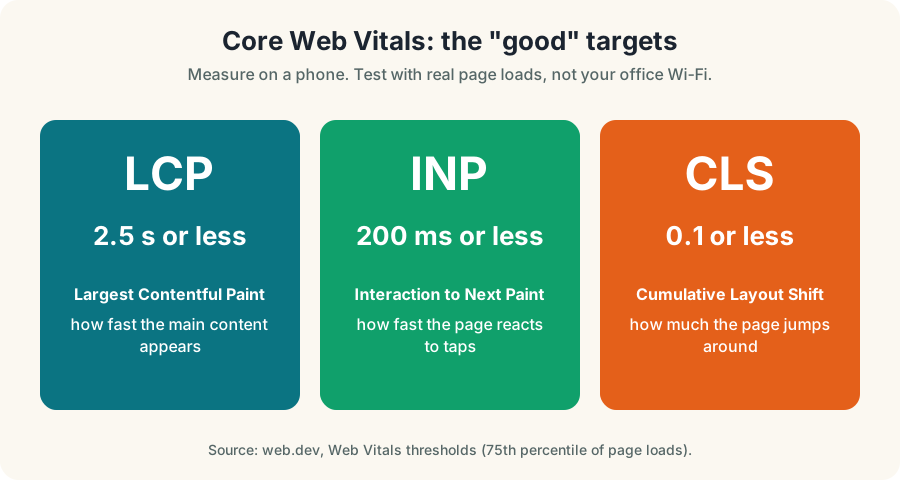
- Google's Web Vitals marks for good pages are LCP 2.5 seconds or less, INP 200 milliseconds or less and CLS 0.1 or less.
- Real photos, clear contact details and simple navigation build more trust than any visual effect.
Website design that Pittsburgh business owners can rely on follows a short list of principles: load fast on a phone, say what you do in one sentence, show real proof and make calling you the easiest thing on the page. Fashion comes last.
This website design Pittsburgh guide is not a list of trends. Trends change, and we will say so plainly. What keeps working is speed, clarity and trust, so that is what this guide covers, with Pittsburgh examples of where your customers are when they find you.
Why Pittsburgh owners should ignore most website design trends
Every year brings new styles: bigger type, new animations, new color moods. Some look good for a season and some slow your pages down. None of them answers the question a customer is asking.
That question is simple. Can this business help me, and how do I reach them? The website design Pittsburgh visitors reward most is the kind that answers it in seconds.
Conversion and speed matter more than fashion. A plain page that loads quickly and has a visible phone number will usually outwork a beautiful page that hides its contact details. We cannot promise a number for your business, but the logic holds across the sites we build.
How to judge a design idea
Ask three questions before you adopt anything new.
- Does it make the page faster, clearer or easier to trust?
- Does it work on a phone, with one thumb?
- Does it help a visitor reach the next step?
If the answer to all three is no, it is decoration. Skip it or save it for later.
Principle 1: Design for the phone first
Many local searches happen on phones, at kitchen tables, in cars and on job sites. Website design Pittsburgh customers can use on the go starts with the phone version. Design that first, then add to it for larger screens.
That means large tap targets, short paragraphs, a visible call button and a menu that opens in one tap. Pittsburgh is a hilly region where people search while moving between neighborhoods, and someone in the Strip District looking for lunch may be on a phone in line.
Test your own site this way. Hold the phone at arm's length and look at your homepage for five seconds. Can you tell what you do and how to call? If not, redesign before you add anything.
Principle 2: Make speed a feature
Speed is part of how people judge a business before they read a word. web.dev, Google's web performance guide, lists good Core Web Vitals marks: LCP of 2.5 seconds or less, INP of 200 milliseconds or less and CLS of 0.1 or less.
You can test your pages for FREE with Google's tools and see which marks you miss. Most slow sites share the same causes: oversized images, heavy plugins, too many fonts and bloated page builders.
- Resize images. Do not upload a camera original when a page needs a fraction of the size.
- Use modern formats. WebP or similar formats keep photos light.
- Cut the extras. Remove plugins, scripts and fonts you do not need.
- Fix layout jumps. Reserve space for images so buttons stay where people tap.
- Test on a phone over a normal mobile connection, not only on office wifi.
Pittsburgh website design teams sometimes treat speed as a developer chore. It is a customer service issue. A visitor who waits too long leaves and calls someone else.
Principle 3: One clear action per page
Every page needs one main job. A homepage might ask for a call, a service page might ask for a quote and a blog post might point to a related service.
Five equal buttons fight each other. Pick a main action and give it the best spot on the page, then keep secondary links quiet.
Do this
- One main button per page
- Phone number visible without scrolling
- Short forms with only the fields you need
- Button text that says what happens next
Not this
- Five equal buttons competing
- A rotating slider nobody reads
- A contact form with twelve fields
- A vague button that says "Submit"
Our post on the conversion focused website goes deeper on how to place and word calls to action.
Principle 4: Use real photos
Visitors judge a local business by whether it looks real. A stock photo of strangers shaking hands says nothing about you. A photo of your team, your shop and your finished work says a lot.
You do not need a studio. A modern phone, good daylight and permission from the people in the photos are enough to start. Add a short caption that says what the photo shows and where.
Real photos also give search engines and assistants something specific to understand. Use descriptive file names and alt text that says what is in the picture, in normal words.
Principle 5: Put trust signals where decisions happen
People decide to call when they feel safe. Trust signals do that job: real reviews, your address, your service area, photos of your team, clear contact details and the credentials you actually hold.
Strong website design Pittsburgh visitors trust places them near the call button, not buried on an About page. A short line of review text beside the phone number can do more than a paragraph of claims.
Keep it true. Do not show badges, awards or numbers you cannot back up. For license, permit or insurance details in Pennsylvania, confirm what applies to your trade with the relevant authority before you publish anything.
Where trust signals go
If you need a system for collecting the reviews, see our guide to common website mistakes that lose leads for what to fix first.
Principle 6: Keep navigation simple
A visitor should find any main page in one or two taps. Long menus with many dropdowns work badly on phones and confuse people on desktops.
Good website design Pittsburgh owners can maintain keeps the main menu to the few pages that matter: your services, your about page, your area and a contact link. Use clear words. "Services" beats "Solutions" and "Contact" beats "Let's Connect".
For businesses with many services, build a services hub page that links to each one. This helps visitors and helps search engines understand how your pages relate.
Principle 7: Write for how people ask
Search traffic in Pittsburgh responds to pages that use headings that sound like the question a customer would ask, and the first sentence under each should answer it. This is good for people and good for search.
Google Search Central says there are no additional requirements, special optimizations, new files or special schema needed to appear in AI Overviews or AI Mode beyond the usual Search fundamentals. Pages need to be indexed and eligible to show with a snippet, and structured data must match the visible text. Clear writing is the design choice that carries over.
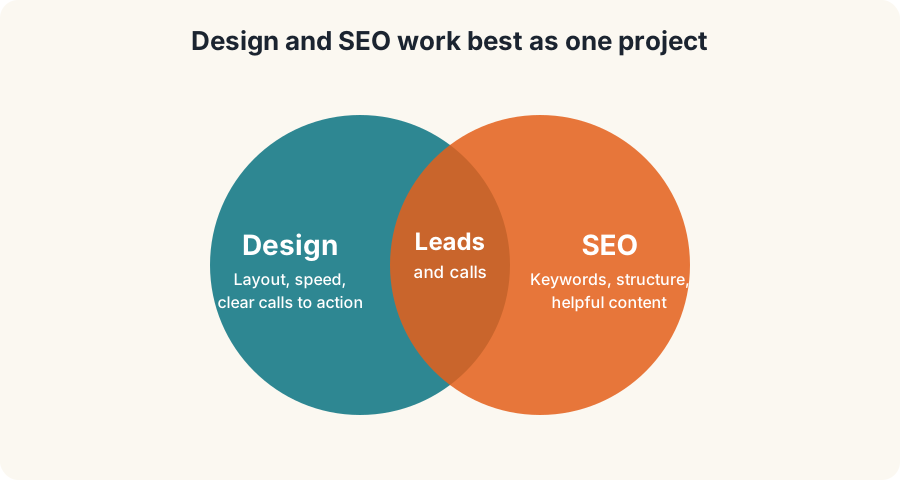
Read how website design Pittsburgh work and search work as a team in SEO and web design together, and see how to measure results in how to track AEO.
Principle 8: Make it accessible
Accessible design means the site works for people who use screen readers, keyboards, zoom or other tools, and for anyone in bright sun or with tired eyes. It is also good business, because it widens who can use your site.
Accessible website design Pittsburgh visitors can use starts with the basics.
- Use readable text. Choose a comfortable size and strong contrast between text and background.
- Label everything. Give images useful alt text and form fields clear labels.
- Support the keyboard. Make sure menus and buttons work without a mouse.
- Do not rely on color alone. Pair color with text or icons.
- Write descriptive links. Use "See our roofing services" instead of "Click here".
Accessibility rules and legal duties vary, so ask a qualified professional if you have questions about what applies to your business. Following the published accessibility guidelines is a sensible place to start.
Principle 9: Build to be maintained
A beautiful site that nobody can update goes stale, and stale website design is something Pittsburgh customers notice quickly. Choose a build that you or your team can edit, and plan who owns updates.
Keep photos, hours, prices of the services you list and your contact details current. Remove old promotions. Search engines and customers both notice when a site looks abandoned.
Our Pittsburgh web design work is built so owners can keep content current without a developer, and our Ohio team does the same through web design in Ohio.
How website design Pittsburgh needs differ by business
The principles stay the same, but the first priority changes. This table is general guidance, not a study.
| Business type | First design priority | What visitors want |
|---|---|---|
| Restaurant or cafe | Menu, hours, location on the first screen | Can I eat here today? |
| Contractor or trade | Call button, service area, project photos | Can they fix my problem soon? |
| Medical or wellness | Clear services, calm layout, easy booking | Is this a safe place to go? |
| Law or professional services | Credentials, process, clear first step | Can I trust this person? |
| Retail or ecommerce | Fast product pages, clear returns, simple checkout | Can I buy without trouble? |
| Studio or creative | Real portfolio, clear booking path | Do I like their work? |
A Pittsburgh small business with one location should show its address and service area early. A business with several areas, such as one serving Mt. Lebanon, Cranberry Township and Monroeville, should list them honestly and avoid cloned pages.
Where Pittsburgh customers see your site
Your website design is rarely the first thing a customer sees. They meet a map listing, a search result or an assistant answer first, and then land on your page with a quick question in mind.
That is why the first screen matters. A visitor arriving from Squirrel Hill, Oakland, Shadyside, Lawrenceville or South Side expects to see your business name, what you do, where you are and a way to reach you without scrolling.
Pew Research Center reported in July 2025 that users clicked a traditional result about 8% of visits when an AI summary appeared versus about 15% without one. Fewer clicks mean the visits you do get must convert, so a clear page matters even more.
Pittsburgh SEO and design belong together
Website design teams in Pittsburgh must plan with search in mind. A page that looks good but cannot be found does nothing, and a page that ranks but confuses visitors wastes the click. Our Pittsburgh SEO services and design work are planned together, and our wider Pittsburgh digital marketing service ties in ads, reviews and tracking.
Design mistakes we see on local business sites
Most problems are old and boring. They also cost calls.
- A homepage that hides the offer. A big image and a slogan, but no sentence about what you do.
- A phone number inside an image. Visitors cannot tap it, and search engines cannot read it.
- Huge hero videos. They slow the page and rarely help someone decide.
- Pop ups that cover the content. Visitors on phones leave instead of closing them.
- Tiny, low contrast text. It looks neat in a design file and fails in sunlight.
- No clear service area. Visitors in Robinson, Wexford or Bethel Park cannot tell whether you come to them.
Fixing these costs less than a redesign, and they are a good place to start before you spend on anything new. Our team often begins a Pittsburgh web design project with an audit of exactly these items.
When a trend is fine
Some trends are harmless. Bold headings, rounded buttons and generous white space can make a page easier to read. Adopt them when they help, and drop them when the next style arrives. The test is the same each time: does the page load fast, read clearly and lead to a call?
A redesign checklist you can use this week
You do not need a full rebuild to improve. Work through this list on your current site.
- Open the site on your phone and time how long it takes to see what you do.
- Check that your phone number is tappable and visible without scrolling.
- Replace the worst stock photo with a real one.
- Remove one thing that slows the page, such as an unused plugin or oversized image.
- Read your menu and cut it to the pages that matter.
- Add one real review near the main button, with permission.
- Test the contact form yourself and confirm that it sends.
If calls from your site are slipping through, our FREE missed call calculator shows what unanswered calls could cost you. We also offer a FREE AI visibility test to see how assistants describe your business today.
How to choose a designer or agency
When you hire for website design in Pittsburgh, ask any provider how they will make the site fast, how they will design the phone version, how you will update it and how they will measure calls. Be careful of anyone who promises a ranking or leads with trends instead of your customers.
A good partner explains choices in terms of your customers, and shows real work. They should be happy to talk about speed, accessibility and tracking, not just visuals.
Start with the next step
The website design Pittsburgh owners get right is simple, fast and honest.
Pick one principle from this guide and fix it this week. For most Pittsburgh businesses, that is speed or the call button.
If you want help, talk to us through the contact page. We will tell you plainly which website design changes we think will pay off for your business, and which ones can wait.
Questions, answered
What matters most in website design Pittsburgh businesses need?
Speed, a clear message and an easy way to call or book matter most. Visual style helps only when it supports those three things.
Do design trends matter for a small business site?
Sometimes, but less than most people think. Trends change, while speed, clarity, mobile usability and trust signals keep working. Adopt a trend only if it does not slow the page or hide the next step.
How fast should my website be?
web.dev lists good Core Web Vitals marks as Largest Contentful Paint of 2.5 seconds or less, Interaction to Next Paint of 200 milliseconds or less and Cumulative Layout Shift of 0.1 or less. You can test your own pages for FREE.
Should I use stock photos or real photos?
Use real photos of your team, shop, work and neighborhood wherever you can. Visitors judge a local business by whether it looks real, and stock images rarely help with that.
Does web design affect SEO?
Yes. A site that is fast, easy to crawl and clear to read supports search visibility, and Google says AI features need no special files, only the usual Search fundamentals. Design and SEO work best planned together.
Ask Eighty. He answers in plain English, any time.
Want this done for your business?
Book a FREE 20-minute growth call. We will tell you where you stand and what to fix first.
Get my FREE growth plan WebsitesConversion Focused Website: 9 Parts That Win Leads
 WebsitesWebsite Mistakes Losing Leads: 9 Pittsburgh Fixes