
Home / Blog / How to Optimize for AEO: A 7-Part Checklist
AI searchHow to Optimize for AEO: A 7-Part Checklist
How to optimize for AEO in seven parts: open crawler access, answer real questions first, keep facts consistent and prove trust. Includes Pittsburgh checks.

- Check that search crawlers and OpenAI's OAI-SearchBot can reach your pages.
- Answer real customer questions in the first sentence under each heading.
- Keep your business name, address, phone and hours identical everywhere.
- Structured data is optional and must match what visitors can see.
To optimize for AEO, make sure search and AI crawlers can reach your pages, answer real customer questions in the first sentence of each section, keep your business facts identical everywhere online, and show proof that you are a real, trusted business. That is the whole job, and the checklist below breaks it into steps you can finish in a few weeks.
This guide is the practical companion to our explainer on what AEO is. If you want the basics of the idea first, start there. If you want to start fixing things today, keep reading.
Before you optimize for AEO: what AEO is not
Google says there are no additional requirements to appear in AI Overviews or AI Mode, and that you do not need special AI files or special structured data. So this checklist does not include any secret tricks. Every step is either basic SEO done carefully, or plain writing and honesty.
Part 1: Make sure the doors are open
Nothing else works if crawlers cannot reach your pages. Check these four things first.
- Pages are indexed. Search for your business name and a main service. In Google Search Console, use the URL Inspection tool on your key pages to confirm they are indexed. Google says a page must be indexed and eligible to appear in Search with a snippet to be a supporting link in AI features.
- robots.txt is not blocking you. Open yourwebsite.com/robots.txt. A line such as "Disallow: /" under "User-agent: *" blocks everything.
- OAI-SearchBot is allowed. OpenAI says OAI-SearchBot is the crawler that surfaces sites in ChatGPT search, and that sites opted out of it will not be shown in ChatGPT search answers. OpenAI also notes it can take about 24 hours for a robots.txt update to take effect in search.
- No accidental noindex. Some site builders add a "noindex" tag during development. Make sure it is gone from the live site.
A note on GPTBot and training
OpenAI describes GPTBot as the crawler for content that may be used to train its generative AI models, and says each robots.txt setting is independent. So you can allow search visibility and still disallow training if you prefer. That is a business decision. If your goal is to be found, make sure the search crawler is allowed.
Part 2: Pick the questions you will answer
AEO starts with questions, not keywords. The good news is that you already hear them every week.
- Mine your own inbox and phone calls. Write down every question a customer asked in the last three months.
- Add the questions people ask before they call. Cost, timing, process, service area, warranty, what to prepare.
- Check Google's autocomplete and the "People also ask" box. Type your service and see how people finish the sentence.
- Group them. Questions about price, process, comparison and local service usually become separate pages or sections.
Which keywords go with this
Questions already contain keywords. "How to optimize for AEO", "AEO tips" and "AEO optimization checklist" are all the same need phrased three ways. Write one strong page that answers it, and use the natural variations in your headings and sentences. Do not paste the same phrase over and over.
Part 3: How to optimize for AEO with answer-first content
For each question, use the same simple structure.
- A heading that matches the question. "How long does a roof repair take?"
- A direct answer in the first sentence. "Most small roof repairs take a few hours to a day, depending on damage and weather."
- The explanation. What changes the answer, with short paragraphs and lists.
- A next step. Call, book or get a quote.
Answer-first
- States the answer in sentence one
- Names what changes the answer
- Uses plain words
- Ends with a next step
Vague
- Starts with a history of the industry
- Hides the answer in paragraph five
- Uses jargon
- No next step
Be honest about numbers. If you do not have a real price range or timeframe, say what it depends on rather than inventing one.
Part 4: Make your facts consistent
Answer engines compare sources. When the same facts appear in many places, trust goes up. Decide on one correct version of each of the following and use it everywhere.
- Business name. Exactly as it is on your Google Business Profile.
- Address and service area. Same format everywhere.
- Phone number. The same main number on your site, profile and directories.
- Hours. Update holiday hours on your profile as well.
- Services list. The same wording and the same main category.
Then update your Google Business Profile, your website footer, your main directory listings and your social profiles to match. If you are in Ohio or Pennsylvania, our Google Business Profile service handles this cleanup for local businesses.
Part 5: Add trust signals
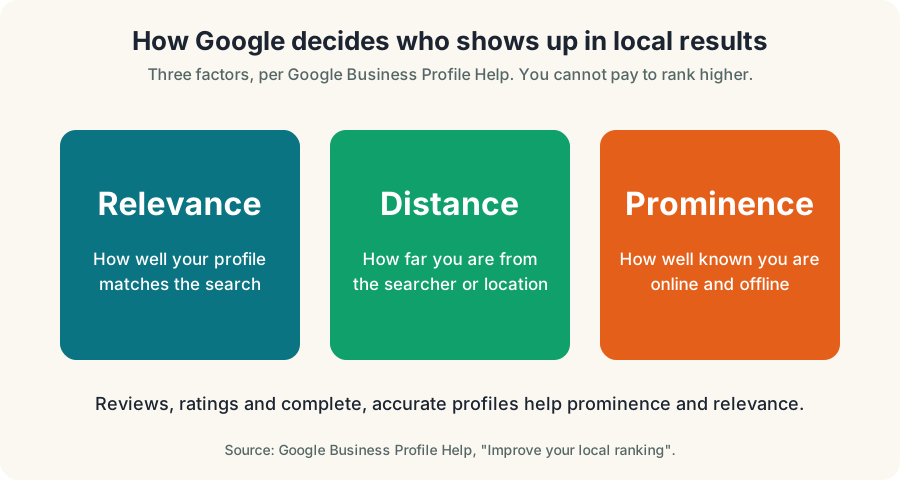
- Real reviews. Ask after every job and reply to every review. Google says more reviews and positive ratings can improve local ranking.
- Real people. An About page with names, photos and what each person does.
- Real proof. Before and after photos, case examples with permission, and certifications you actually hold.
- Named sources. When you quote a fact, link to where it came from.
- Mentions elsewhere. Local chambers, associations, suppliers and partners that link to you.
What about structured data?
Structured data, such as LocalBusiness or FAQ markup, can help machines read your page, but Google says there is no special schema you need for AI features. The rule that matters is that the markup should match the visible text on the page. Do not mark up reviews, prices or questions that visitors cannot see.
Part 6: Check page experience
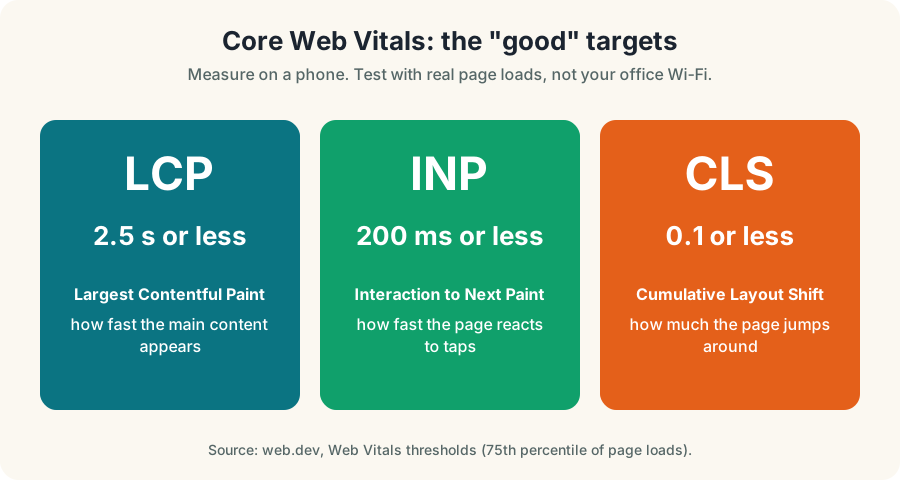
Fast, readable pages help everyone, including crawlers. Google's Web Vitals give targets you can test for FREE: Largest Contentful Paint of 2.5 seconds or less, Interaction to Next Paint of 200 milliseconds or less and Cumulative Layout Shift of 0.1 or less. Test your main pages on a phone and fix the biggest problems first: oversized images, heavy scripts and layout that jumps.
The AEO optimization checklist
- My key pages are indexed in Google Search Console.
- robots.txt does not block search crawlers or OAI-SearchBot.
- No accidental noindex on live pages.
- I wrote down my ten most common customer questions.
- Each question has a heading and a direct first sentence.
- My name, address, phone, hours and services match everywhere.
- My Google Business Profile is complete and current.
- I ask for reviews after every job and reply to all of them.
- My About page shows real people.
- Structured data, if used, matches visible text.
- My main pages pass basic speed tests on a phone.
- I check Search Console and my leads every month.
How long until you see results?
Be careful with anyone who gives a date. Google says crawling can take anywhere from several days to several months depending on how often a page is refreshed. After that, results vary by market and competition. A realistic way to judge progress is to watch three things monthly: impressions and clicks in Search Console, calls and form leads, and whether assistants start naming you when you test real customer questions. Our guide on how to track AEO walks through it.
Common mistakes
- Blocking crawlers by accident. Often a leftover from a staging site.
- Writing for the keyword, not the question. Stuffing the phrase makes the page worse.
- Inconsistent business details. An old phone number on one directory can undo your work.
- Inventing numbers. If you cannot back it up, leave it out.
- Expecting overnight results. This is steady work, not a switch.
What to do this week
- Check robots.txt and Search Console indexing for your top five pages.
- Write your ten customer questions.
- Rewrite the first sentence under three headings so each one answers its question.
- Audit your name, address and phone number across the web.
- Ask your last five happy customers for a review.
If you would rather have us do it, see what AEO services should include, or start with our FREE AI Visibility Test.
Your Pittsburgh AEO checklist addendum
Add these local checks to the list above if you serve Pittsburgh. First, confirm your Google Business Profile categories, service areas and hours are accurate. Second, create or improve one page per core service and one page for each Pittsburgh area where you genuinely work. Third, write answers to the questions Pittsburgh customers ask: snow and freeze-thaw damage, older housing stock, permits in the city versus the surrounding boroughs, and parking or access in dense neighborhoods.
Our Pittsburgh SEO services page explains how we build local pages that are genuinely useful.
That is how to optimize for AEO without tricks: fix access, answer questions, keep facts consistent and measure the result. If you want to know how to optimize for AEO on a tight budget, start with your top five pages.
Worked examples by industry
The pattern is the same everywhere, but the details change by business. These are illustrative examples of how to apply this checklist in common local industries. Replace the details with your own real facts.
A roofing or home services company
Customers ask: "How much does a roof replacement cost in Youngstown?", "How long does it take?" and "Do I need a permit?" A strong page opens with a plain answer, explains what changes the price (size, pitch, materials, tear-off layers), shows the steps in order and says what a written estimate includes. It names the service area, shows real project photos and lists the company's license and insurance details only if they are real and current.
A dental or medical practice
Patients ask: "Do you take my insurance?", "What happens at a first visit?" and "Is there an emergency appointment?" Pages should answer plainly, avoid promises about outcomes and be reviewed by the practice for accuracy. Health claims need extra care, so state only what the practice can stand behind.
A restaurant or cafe
Guests ask: "Do you have gluten-free options?", "Is there parking?" and "Can you host 20 people?" Put hours, menu, dietary notes, parking and private-event details in plain text, not only in images or PDFs. Keep them identical on the website and Google Business Profile.
A law, accounting or consulting firm
Clients ask: "What does a consultation cost?" and "What should I bring?" Explain the process, who the service is for and who it is not for. Avoid guarantees. Published expertise should be written by the real person who does the work, with a real bio.
An ecommerce or retail shop
Shoppers ask: "Which size should I choose?" and "Can I return this?" Product pages that answer those questions, with consistent product data, give search engines and assistants something dependable to use.
A step-by-step rewrite you can copy
Take one page and do this in order.
- Write the question the page should answer, in the words a customer would use.
- Write a two-sentence answer and put it at the top.
- Add the details underneath: steps, costs, timelines, requirements.
- Add proof. Real photos, real reviews, real credentials and real examples.
- Add a short FAQ of questions people actually ask, with direct answers.
- Check the facts. Every number, name, hour and price must be true today.
- Add a next step. A call button, a form or a booking link.
Common questions people ask next
Is this just SEO with a new name?
Mostly it builds on the same foundation. Clear, useful, accurate pages on a technically healthy site are what both depend on. The difference is emphasis: AEO focuses on direct answers, clear facts, trust and being easy to quote.
Do I need a special file or markup?
Google says there are no additional requirements or special optimizations for its AI features beyond being indexed and eligible to show with a snippet. Structured data is still worth using where it fits, as long as it matches what visitors can see on the page.
How long until I see results?
There is no fixed timeline. Google says crawling and indexing can take anywhere from several days to several months, and results depend on competition and the quality of your pages. Plan on months, not days, and measure monthly.
Can I pay to be recommended?
No reputable method guarantees a mention in an AI answer, and Google says you cannot pay to improve your local ranking. Be suspicious of anyone who promises guaranteed placement.
Glossary
Terms
- AEO: Answer Engine Optimization, making content easy to use as an answer.
- AI Overview: an AI-generated summary shown in Google results.
- Snippet: the text excerpt shown for a page in results.
- Crawler: software that visits pages to read them.
More terms
- Structured data: code that labels facts on a page for machines.
- Citation: a source an assistant links or names in an answer.
- Prompt: the question a person types or says to an assistant.
- Entity: a clearly identified thing, such as your business.
A 90-day plan
- Days 1 to 30: foundation. Confirm your site is indexed, crawlers are allowed, your Google Business Profile is complete and your facts match everywhere.
- Days 31 to 60: content. Rewrite your five most important pages answer-first and add honest FAQs.
- Days 61 to 90: proof and measurement. Collect real reviews, add case examples you have permission to share and start a monthly prompt-testing sheet.
Honest limits
No one controls what an AI assistant says. Answers change, sources change and platforms change their rules. What you can control is the quality, clarity and accuracy of what you publish, and how easy it is for customers and machines to trust it. That is a good investment even if the technology shifts, because the same pages serve people who find you in any way.
Questions, answered
How do I optimize my website for AEO?
Allow search and AI search crawlers, write answer-first sections for real customer questions, keep business facts consistent, collect real reviews and make pages fast on phones.
What is an AEO checklist?
A short list of access, content, consistency, trust and speed checks that make your business easier for search engines and AI assistants to understand and trust.
Should I block GPTBot?
That is your choice. OpenAI says each crawler setting is independent, so you can allow OAI-SearchBot for search visibility while disallowing GPTBot for model training.
How long does AEO take to work?
It varies. Google says crawling can take anywhere from several days to several months, and results depend on your market and competition. Nobody can guarantee a date or a position.
Do I need FAQ schema for AEO?
No. Google says no special schema is required for its AI features. If you use FAQ markup, it should match visible text on the page.
Ask Eighty. He answers in plain English, any time.
Want this done for your business?
Book a FREE 20-minute growth call. We will tell you where you stand and what to fix first.
Get my FREE growth plan AI searchAEO Content: What It Looks Like, With Examples
 AI searchAEO for Ecommerce: Get Your Products Recommended
 AI searchAEO Services: What They Include and What to Avoid