
Home / Blog / Google Business Profile Pittsburgh: What to Fix in 2026
Google Business ProfileGoogle Business Profile Pittsburgh: What to Fix in 2026
Google Business Profile in Pittsburgh: fix your name, categories, reviews and photos, avoid suspensions and get found in Maps and AI answers in 2026.

- Google ranks local results on relevance, distance and prominence. You can improve relevance and prominence, but you cannot change distance.
- The fastest fixes are FREE: use your real business name, choose the right primary category, keep hours exact and add real photos.
- Keywords in your business name can get a profile suspended. Google's guidelines say the name should match your real world name.
- Ask every customer for a review, never offer rewards and never ask only happy customers. Google and the FTC both have rules.
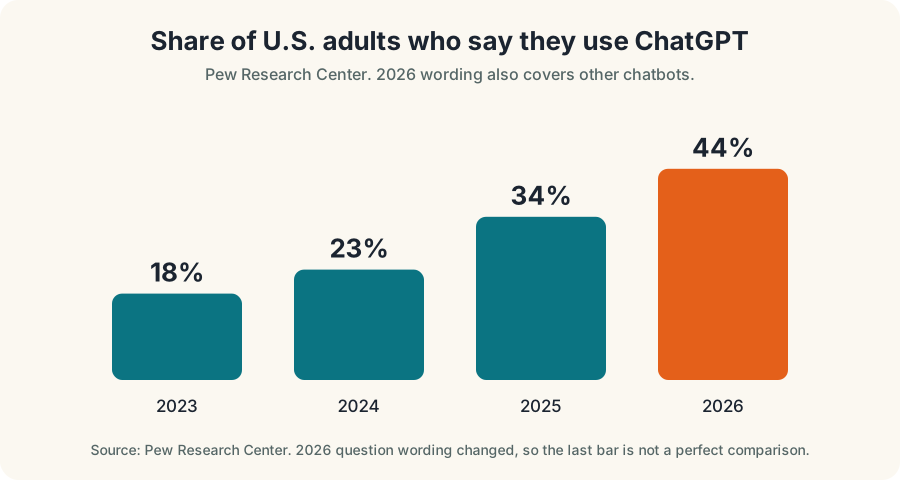
- Pew Research Center found 44% of U.S. adults said they use ChatGPT in 2026, up from 18% in 2023. Consistent profile facts help assistants and people alike.
To improve your Google Business Profile in Pittsburgh, fix the FREE basics first: use your real business name, pick the right primary category, keep hours and phone exact, add real photos and ask every customer for a review. Google says local results depend on relevance, distance and prominence, and those basics are how you raise the first and third.
The Pittsburgh metro area has 211,141 small businesses, according to the U.S. SBA Office of Advocacy's 2025 profile (2022 Census data), so a lot of them compete for the same few map spots. This guide covers what to fix, what to leave alone, which shortcuts can get you suspended, and how a clean profile helps in AI search.
What your profile does, in one minute
Your Google Business Profile is the FREE listing that shows when someone searches for a business on Google Search or Google Maps. It shows your name, address, hours, phone, photos, reviews and website link. For a customer in a hurry it is often the whole decision: they look, tap call and never visit your website.
Google explains the ranking in three parts.
| Factor | What it means | Can you change it? |
|---|---|---|
| Relevance | How well your profile matches what the person searched for | Yes, with accurate categories, services and a full profile |
| Distance | How far you are from the searcher, or from the location named in the search | No |
| Prominence | How well known you are, from reviews, links, articles and your overall web presence | Yes, over time |
In Pittsburgh that third column matters more than you might think. A searcher in Shadyside will see Shadyside businesses first. Your job is to be the best match among the businesses already near them, not to move your building.
The 10 fixes, in order
- Use your real business name.
- Pick the right primary category.
- Add every true secondary category and service.
- Make address, service area and hours exact.
- Use a local phone number and a working link.
- Write a clear description.
- Add real photos and video.
- Earn reviews the honest way.
- Reply to every review.
- Keep your website and listings consistent.
Fix 1: Use your real business name
This is the most common mistake we see, and the riskiest. Google's guidelines say your name should reflect your real world name, the one on your signage, website and paperwork. They say not to add marketing taglines, phone numbers, URLs, hours or service descriptions. A plumber should not rename the profile "Best Plumber Pittsburgh 24/7."
It is tempting because a competitor may seem to rank well with a stuffed name. Do not copy it. Google's rules decide what is allowed, and a suspended profile ranks for nothing. If a competitor breaks the rules, you can report it through Google's tools.
Fix 2: Pick the right primary category
Your primary category is one of the strongest relevance signals you control. Choose the one that matches your main money-making service, not the broadest label. A roofer should pick a roofing category, not a general contractor. Check what the top listings in your area use, but only copy a category if it truly describes you.
Fix 3: Add true secondary categories and services
Secondary categories and the services list tell Google what else you do. Add the ones that are real and that you want calls for. Do not add categories for services you do not offer, because customers will call and be disappointed, and it can lead to reports against your profile.
Fix 4: Make address, service area and hours exact
If customers visit you, show your address. If you travel to customers and do not meet them at your location, Google's guidelines say a service area business should hide the address and set the area it serves. A rented mailbox or virtual office where you do not operate is not eligible. Hours must be exact. Update them for holidays and for events that matter locally, such as game days or storms. If you are open by appointment only, Google says not to enter hours.
Fix 5: Use a local phone number and a working link
Use a phone number that reaches you directly. Google's guidelines say to use a local number that connects to your location, not a central call center, wherever possible. Link to the page that best matches the profile, such as the location page or the main service page, and make sure it loads fast on a phone. Track calls and clicks from the profile so you can see what it earns.
Fix 6: Write a clear description
Write two or three short paragraphs: what you do, who you serve, where, and what makes you different, using real facts. Do not stuff keywords, add links or make claims you cannot prove. Mention the neighborhoods you actually serve, such as the North Hills, Mt. Lebanon or Oakland, in natural sentences.
Fix 7: Add real photos and video
Add clear photos of your storefront, the entrance, your team, your work and your vehicles. Show parking and the sign so people find you. Use your own photos, not stock images, and update them often. Make sure people shown have given permission.
Fix 8: Earn reviews the honest way
Reviews feed prominence, and they are the first thing many customers read. Both Google and the FTC have rules, so follow them.
- Ask every customer. Google's contributor policy says not to selectively ask only for positive reviews.
- Never pay or reward for reviews. No discounts, gifts or entries in a draw.
- Never fake or buy reviews. The FTC finalized a rule in 2024 banning fake reviews and testimonials, including AI generated ones, and the agency can seek civil penalties against knowing violators.
- Never threaten or discourage negative reviews. The FTC's rule covers review suppression too.
- Make it easy. Send a direct link by text after the job, while the experience is fresh.
Report only real numbers when you talk about your reviews.
Fix 9: Reply to every review
Reply to positive reviews briefly and to negative ones calmly. Thank the person, address the specific issue, and offer to make it right offline. Do not argue and do not reveal private details. A thoughtful reply to a bad review often does more than the review costs you. If you want a head start, try our FREE review reply generator, and read about our review management service.
Fix 10: Keep your website and listings consistent
Your name, address and phone should match on your website, your profile and the directories that matter in your trade. Mismatches, like an old phone number or a former suite, confuse people and search tools. Do a quick sweep once a quarter. Whitespark's 2026 survey of 47 local SEO experts also points to the importance of consistent mentions of your business on trusted sites, a point that carries into AI search.
Pittsburgh examples of what to fix (illustrative, not client results)
These examples show the pattern. They are not real clients.
| Business | Common problem | Fix |
|---|---|---|
| Plumber serving the South Hills | Name stuffed with "Pittsburgh emergency plumber" | Return to the real name and use the description for services |
| Dentist in Squirrel Hill | Old phone number and wrong Saturday hours | Update the profile, site and directories to match |
| Lawrenceville bakery | Few photos and unanswered reviews | Add real photos weekly and reply to every review |
| HVAC company in Cranberry | Service area hidden but address shown | Choose one setting that matches how customers are served |
What can get a profile suspended
Suspensions hurt because a profile can disappear from Maps while you fight to restore it. The usual causes are avoidable.
- A name with keywords or locations added.
- A virtual office or mailbox as the address.
- Multiple profiles for the same location. Google says not to create more than one profile per location.
- Fake or incentivized reviews.
- Changing the name or address in a way that looks like a different business.
Before making big changes, read Google's guidelines and keep proof of your real world name, such as signage photos or paperwork. If you are suspended, you can request reinstatement and provide that evidence.
Does your profile matter in AI search?
More customers now ask an assistant before they open a map. Pew Research Center found 44% of U.S. adults said they use ChatGPT in 2026, up from 34% in 2025, 23% in 2024 and 18% in 2023. Pew changed its question wording in 2026 to cover other chatbots too, so the earlier and later figures are not perfectly comparable, but the direction is clear.
Here is what is firmly known. Google says there are no extra requirements to appear in its AI Overviews or AI Mode, and no special markup is needed. To be a supporting link, a page must be indexed and eligible to show in Search with a snippet. Nothing published says a profile setting gets you into an AI answer, so be cautious with anyone who claims otherwise.
What you can do is make your facts easy to find and trust.
- Keep facts identical everywhere. Name, address, phone, hours and services should match on your profile, site and listings.
- Say what you do in plain, direct sentences. Put the answer first on your service pages.
- Earn real, recent reviews. Customers and search tools both read them.
- Get mentioned on trusted local sources. Think chambers of commerce, trade associations and local news, not paid link lists.
- Test yourself. Ask a few assistants the questions your customers ask, and note whether you appear and whether the facts are right. Our FREE AI Visibility Test is a fast way to begin.
For a deeper look, read what AEO is, how to track AEO and our Pittsburgh AI search optimization service page. We also covered how Google's AI links update affects Pittsburgh small businesses.
Your profile is not your whole strategy
A great profile gets people to look. Your website has to close the sale. If a customer taps through and the page is slow, confusing or off topic, the profile's work is wasted. Build one page per main service and one for each place you serve, with a phone number that stays visible on mobile. Our guide to ranking on Google Maps covers the Ohio side of the same approach, and our Pittsburgh SEO services page explains how profile work fits into a wider plan. If you serve both Pittsburgh and Ohio, keep each location's profile and page separate and honest.
How to tell whether the fixes worked
Your profile shows how people interact with it: calls, direction requests, website clicks and messages. Write down the numbers for the last three months before you change anything, then compare month by month. Give changes time. Profile edits can be reviewed before they show, and customer behavior shifts slowly, so judge a change over a few weeks, not a few days.
Do not stop at profile numbers. Ask every new customer how they found you and write it down. Pair that with call tracking on the number you list. If calls from the profile rise but booked jobs do not, the problem is probably what happens after the call: speed of answer, the quote or the follow up. In that case, more profile work will not fix it. Our FREE Business Growth Lab helps you see where customers drop off.
Mistakes we see most often
- Treating the profile as set and forget. Hours change, services change and old photos make a business look closed.
- Ignoring reviews for months. Unanswered complaints tell the next customer you do not care.
- Choosing too many categories. A long list of loosely related categories dilutes the match to what you actually do best.
- Sending the link to a slow home page. The profile earns the tap and the website loses it.
- Letting an old employee or agency keep control. Make sure you are an owner of the profile, and keep a second owner as a backup.
If more than one person manages the profile, write down who does what. A shared note with the login owner, the review reply rules and the monthly routine saves a lot of trouble when someone leaves.
A 30 minute monthly routine
- Check the basics (5 minutes). Name, address, phone, hours and link are correct.
- Reply to new reviews (10 minutes). Every one, positive and negative.
- Add fresh photos (5 minutes). Real work, real team.
- Review insights (5 minutes). Calls, direction requests and website clicks versus last month.
- Sweep for problems (5 minutes). Search your own name for duplicates, wrong edits or new competitors.
Our FREE Map-Pack Showdown shows how you compare with the businesses around you, and our Google Business Profile optimization page lists what we do for clients.
Next step
Do Fixes 1, 2 and 4 today. They take under an hour and cost nothing. If you want a second opinion on your profile, book a FREE growth call and send us the link. We will tell you what we would fix first.
Questions, answered
How do I rank higher on Google Maps in Pittsburgh?
Google says local results are based on relevance, distance and prominence. Make your profile complete and accurate, choose the right categories, earn genuine reviews, and keep your website and listings consistent. You cannot change distance, so do not chase it.
Can I put keywords in my Google Business Profile name?
No. Google's guidelines say your name should match your real world name on your signage and website. Adding service words or locations can get a profile suspended, even if a competitor appears to get away with it.
How many reviews do I need?
There is no magic number. Ask for reviews from every customer as part of normal work, reply to each one, and keep the flow steady. Look at the top businesses for your search and aim to be competitive, not to hit an arbitrary count.
Can I hide my home address on my profile?
If you serve customers at their location and do not meet them at yours, Google's guidelines say you can hide your address and set a service area. If customers visit you, show the address.
Does my Google Business Profile affect ChatGPT or Google AI answers?
No one outside the platforms can promise it. Google says there are no special requirements for its AI features. A complete, accurate profile and consistent facts across your website and listings are what you control.
Ask Eighty. He answers in plain English, any time.
Want this done for your business?
Book a FREE 20-minute growth call. We will tell you where you stand and what to fix first.
Get my FREE growth plan Google Business ProfileGoogle Maps Ranking Youngstown: 9 Steps That Work in 2026
 WebsitesWebsite Mistakes Losing Leads: 9 Pittsburgh Fixes