
Home / Blog / Pittsburgh Website Redesign: 10 Steps to Keep Your Rankings
WebsitesPittsburgh Website Redesign: 10 Steps to Keep Your Rankings
Planning a website redesign in Pittsburgh? Follow these 10 steps to protect your Google rankings, redirect old pages, speed up the site and win more calls.

- A redesign can lift leads or wipe out years of rankings. The difference is a plan for old URLs, content and speed made before launch, not after.
- Keep a 301 redirect from every old address to its closest new page. Google's guidance is to keep redirects as long as possible, generally at least a year.
- Speed is worth real money. A Deloitte study of 37 brands found a 0.1 second mobile speed gain lifted retail conversions 8.4% and travel conversions 10.1%.
- Aim for Google's Core Web Vitals targets on mobile: LCP 2.5 seconds or less, INP 200 milliseconds or less, CLS 0.1 or less.
- Do not delete pages that already bring in calls. Rewrite them, merge them with care, and redirect what you retire.
A Pittsburgh website redesign protects your Google rankings when you plan the old addresses, the content that earns traffic and the page speed before you launch, not after. Do those three things and a new design can bring in more calls. Skip them and a good looking site can quietly lose the rankings you spent years earning.
This is a ten step checklist written for owners, not developers. It follows the order we use on real projects: take stock, protect what works, rebuild, test and watch. Each step names the risk it prevents and the proof behind it.
Why redesigns go wrong
Most redesign damage comes from four avoidable mistakes. A designer focused on looks may not see them, so ask about each one before work starts.
- Addresses change and nothing points to the old ones. A page that used to rank at one address now lives at another. Without a redirect, Google and every visitor with a bookmark hit a dead end.
- Pages that earned traffic get cut or thinned. A tidy new menu is not worth losing the one page that brought in half your calls.
- The new site is slower. Big sliders, heavy video and stacked add-ons look good in a mockup and load slowly on a phone.
- Nobody checks the launch. A leftover setting that tells Google to ignore the site can survive from the staging copy into the live one.
Google's own site move guidance covers the first and last points in detail. If you are moving addresses, it tells you to map old URLs to new ones, redirect them, and keep the old redirects running. We link it in the sources below.
The 10 step Pittsburgh website redesign checklist
- Define the business goal. Calls, booked jobs, form fills or store visits.
- Take a snapshot of the current site. Pages, traffic, calls, rankings and speed.
- Decide what stays, merges or goes. Protect the pages that earn money.
- Map every old URL to a new one. This becomes your redirect file.
- Plan the structure and local pages. Services, areas and proof.
- Write the content for people first. Then tune it for search.
- Build for mobile and speed. Hit Core Web Vitals targets.
- Add tracking, schema and business facts. Calls, forms and consistent details.
- Test on a staging copy. Then launch carefully.
- Watch for 90 days. Fix what slips quickly.
Step 1: Define the business goal
Start with what a win looks like. For a plumber in Bethel Park it may be phone calls from emergency searches. For a medical office in Oakland it may be new patient appointment requests. For a boutique in Lawrenceville it may be foot traffic and online orders. A site built to "look modern" with no goal tends to be pretty and quiet.
Write down one primary action and two backup actions. Every page you build later should lead to one of them.
Step 2: Take a snapshot of the current site
You cannot protect what you have not measured. Before any design work, record the baseline. This is also your before and after proof if results ever get disputed.
| What to record | Why it matters |
|---|---|
| Every live page address (a full crawl) | It is the master list for redirects and for deciding what stays |
| Pages that bring organic visits and calls | These are the pages you must not damage |
| Keywords you rank for and where | You will compare after launch |
| Calls, forms and where they came from | You need tracking that survives the move |
| Mobile speed and Core Web Vitals | The new site must beat this |
| Links from other sites to your pages | Those links should land on a live page, not an error |
Our FREE Map-Pack Showdown is a quick way to see how you compare with local competitors on Google Maps before the project starts.
Step 3: Decide what stays, merges or goes
Sort every page into one of four bins. Keep and improve pages that earn traffic or calls. Merge thin pages that cover the same topic. Retire pages with no traffic, no links and no purpose. Add pages you are missing, such as a dedicated page for each main service and each service area.
Be careful with merging. Combining two pages into one can be a good call when both are weak and overlap. It is a bad call when each one ranks for a different search. When in doubt, keep both and make them clearer.
Step 4: Map every old URL to a new one
This is the step that saves rankings. For each old address, pick the closest new page and write a permanent (301) redirect. A page about "furnace repair Mt. Lebanon" should point to the new furnace repair page, not to the home page. Sending everything to the home page confuses visitors and wastes the old page's value.
How long should redirects stay? Google's site move documentation says to keep redirects for as long as possible, generally at least one year. Google's Gary Illyes was more specific in 2021, saying the answer was at least one year, and that the year starts when Google first crawls the redirect. We tell clients to leave them in place for good, since they cost almost nothing to keep.
Step 5: Plan the structure and local pages
A clear structure helps visitors and search engines. Keep the main menu short. Give each core service its own page, and give each place you serve a page that is useful and honest, not a copy of another city page with the name swapped out. A heating company serving Mt. Lebanon, Bethel Park and the South Hills should say something real on each page: typical jobs, the older homes in that area, how fast you can arrive. If you have nothing real to say about a place, do not make a page for it.
If you serve both Pittsburgh and Ohio markets, plan how those pages sit together so they do not compete with each other. Our guide on how SEO and web design work together explains why structure and content should be planned as one.
Step 6: Write the content for people first
Search engines reward pages that help people. Google's own guidance on helpful content asks you to write for visitors, show real experience and be clear about who is behind the page. So write each page to answer the question a customer actually has, in the first sentence, and then back it up with detail.
- Lead with the answer. Say what you do, where and for whom, near the top.
- Show proof. Real photos of your work and team, real reviews, licenses, and years in business that you can document.
- Make the next step obvious. A phone number and button that stay visible on mobile.
- Answer common questions. Put a short FAQ on service pages. Write them for readers first.
- Avoid copy that could fit any business. If you can swap in a competitor's name and the page still reads fine, rewrite it.
Step 7: Build for mobile and speed
Most of your local visitors will arrive on a phone, often in a hurry. Speed is a business decision, not a technical one. Deloitte and Google studied 37 brand sites over 30 days at the end of 2019, covering more than 30 million user sessions. A 0.1 second improvement in mobile load time lifted retail conversions by 8.4% and travel conversions by 10.1% in that study.
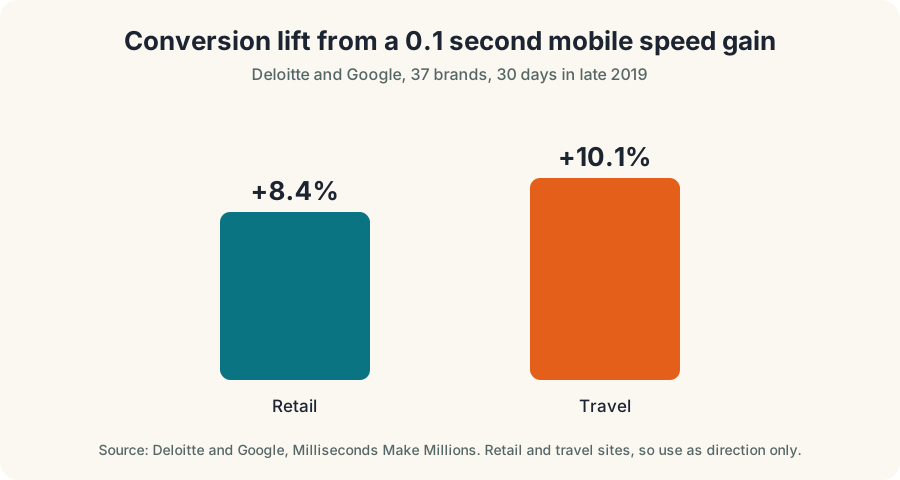
Two limits apply. The study covers retail and travel sites, and it is several years old. A local service business may see a smaller or different effect. It still shows that small speed gains matter, and nothing since has argued otherwise.
Google's Core Web Vitals give you clear targets, judged at the 75th percentile of real visits and reported separately for mobile and desktop.
| Measure | What it tracks | Good target |
|---|---|---|
| Largest Contentful Paint (LCP) | How fast the main content appears | 2.5 seconds or less |
| Interaction to Next Paint (INP) | How fast the page responds to taps and clicks | 200 milliseconds or less |
| Cumulative Layout Shift (CLS) | How much the page jumps around while loading | 0.1 or less |
Practical ways to hit them: compress and size images properly, limit add-ons and scripts, avoid autoplay video at the top of the page, and test on a mid-range phone with a normal connection, not only on a fast office computer.
Step 8: Add tracking, schema and business facts
Set up call tracking and form tracking before launch so you can compare results with your baseline. Make your business name, address, phone number and hours identical on the site and your Google Business Profile. If you are not sure how to handle the profile, read our Google Maps ranking guide.
Structured data (schema) is the labeled code that tells machines what a page is. Use it where it matches visible content, such as your business details and articles. Google says there is no special schema required to appear in its AI Overviews or AI Mode, so treat schema as good housekeeping, not a trick.
Step 9: Test on a staging copy, then launch carefully
Build and test the new site on a private copy that search engines cannot see. Then run this pre-launch list.
- Click every important link on a phone and a computer.
- Test every form and phone link. Confirm that submissions arrive.
- Test the redirect file by loading a sample of old addresses.
- Remove any block that hides the site from search. Check settings that were on the staging copy.
- Check titles, descriptions and headings on each key page.
- Submit the new sitemap to Google after launch.
- Pick a launch time with low traffic and a person ready to fix problems.
Step 10: Watch for 90 days
Expect some movement for a few weeks. Rankings can wobble while Google re-crawls the new pages. Check weekly: Google Search Console errors, redirect problems, calls and form fills against your baseline, and your Google Business Profile for any mismatch. Fix issues quickly, and do not make five other changes at the same time, or you will not know which one caused what.
What a redesign does for AI search
More people now ask an AI assistant before they search. Pew Research Center found 44% of U.S. adults said they use ChatGPT in 2026, up from 18% in 2023, though Pew changed its question wording, so the two figures are not a perfect comparison.
A redesign is a natural time to get ready, and the good news is that the work overlaps with everything above. Google says there are no extra requirements to appear in its AI features: a page needs to be indexed and eligible to show with a snippet. So the useful moves are the ones you already planned.
- Put the answer first on each page. Short, direct sentences are easier for people and machines to use.
- Keep business facts identical everywhere. Name, address, phone, hours and services should match your profile and listings.
- Use real photos and real names. It helps customers trust you, and it gives search tools something specific to work with.
- Let crawlers in. Do not block important pages in settings you forgot to check.
We cover this in more depth in our Pittsburgh AI search optimization service page and in our guide to what AEO is. You can also try our FREE AI Visibility Test to see where your business stands.
A worked example, to show the method (illustrative, not a client result)
Say a Pittsburgh roofing company has an old site with 40 pages. A crawl shows 12 pages bring almost all the organic visits and calls, 18 are thin duplicates, and 10 have no traffic at all. The redesign plan keeps and rewrites the 12, merges the 18 into 6 stronger pages, and retires the 10. Every old address gets a 301 redirect to its closest new page, so the 34 retired or merged addresses all point somewhere useful. The new site has 18 pages instead of 40, loads faster on a phone, and has one clear call button. Those numbers are invented to show the process. Your own crawl will give you the real ones.
Common questions about costs and timing
Prices for a Pittsburgh redesign vary with the number of pages, custom features, content writing and how much of the work involves tracking and redirects. Rather than guess, ask every designer for a written scope that lists page count, content work, redirects, speed targets, tracking, training and who owns the site and domain. If a quote leaves those out, you are not comparing the same thing. Our price page lists our current plans, and our post on choosing a digital marketing agency in Pittsburgh gives you questions to ask any provider.
Timing depends mostly on how fast you approve content. A designer can build quickly when copy, photos and decisions arrive on schedule. The delay is almost always waiting for words and photos. Start those early.
Website design trends worth using, and ones to skip
Design trends come and go. Use ones that serve visitors, and skip ones that cost speed or clarity. Our post on website design trends in Pittsburgh goes through them. As a rule, clean layouts, large readable text, strong contrast, real photos and obvious buttons earn their place. Heavy animation, auto playing video and stacked pop ups usually do not. For the common mistakes that cost leads, see website mistakes that lose leads and what a conversion focused website looks like.
Next step
If you are weighing a redesign, start with Steps 1 through 4 even if you never hire anyone. They take a few hours and they protect what you already have. If you want a second set of eyes, see our Pittsburgh web design and development service, or book a FREE growth call and bring your page list.
Questions, answered
Will a website redesign hurt my Google rankings?
It can if URLs, page content or speed change without a plan. Rankings are usually protected when old pages redirect to their closest new equivalent, the content that earns traffic stays, and the new site is fast and crawlable. Expect some movement for a few weeks either way.
How long should I keep 301 redirects after a redesign?
As long as possible. Google's site move guidance says generally at least one year. Many owners simply leave redirects in place permanently since they cost almost nothing.
How much does a website redesign cost in Pittsburgh?
Prices vary with page count, features and content. Ask every designer for a written scope that lists page count, redirects, content work, speed targets and who owns the site, so you can compare quotes fairly.
How long does a website redesign take?
A small local business site often takes several weeks, and larger sites take longer. Content and approvals, not design, are the usual cause of delay. Build the redirect list and write the copy early.
Do I need to redesign for AI search?
Not as a separate project. Google says there is no special optimization required for AI Overviews or AI Mode. A clear, fast, crawlable site with accurate business facts is what helps, and a redesign is a good moment to build it.
Ask Eighty. He answers in plain English, any time.
Want this done for your business?
Book a FREE 20-minute growth call. We will tell you where you stand and what to fix first.
Get my FREE growth plan WebsitesWebsite Design Pittsburgh: 9 Principles That Win
 SEO basicsSEO and Web Design: 9 Ways They Win in Pittsburgh